Practice Better AI

The most complete AI-powered practice management software for health practitioners

Automate admin work and amplify your impact with a full suite of AI tools purpose-built for your workflow.

HIPAA logoPIPEDA logoGDPR logoG2 bannerCapterra badge

Run your session. Let AI handle the note-taking.

Your practice runs on documentation. AI Charting Assistant makes it instant — so you spend less time typing and more time on client care.

AI Dictation

Speak naturally during your session. Practice Better records and transcribes your session without pausing, app-switching, or note-taking friction.

AI Summary

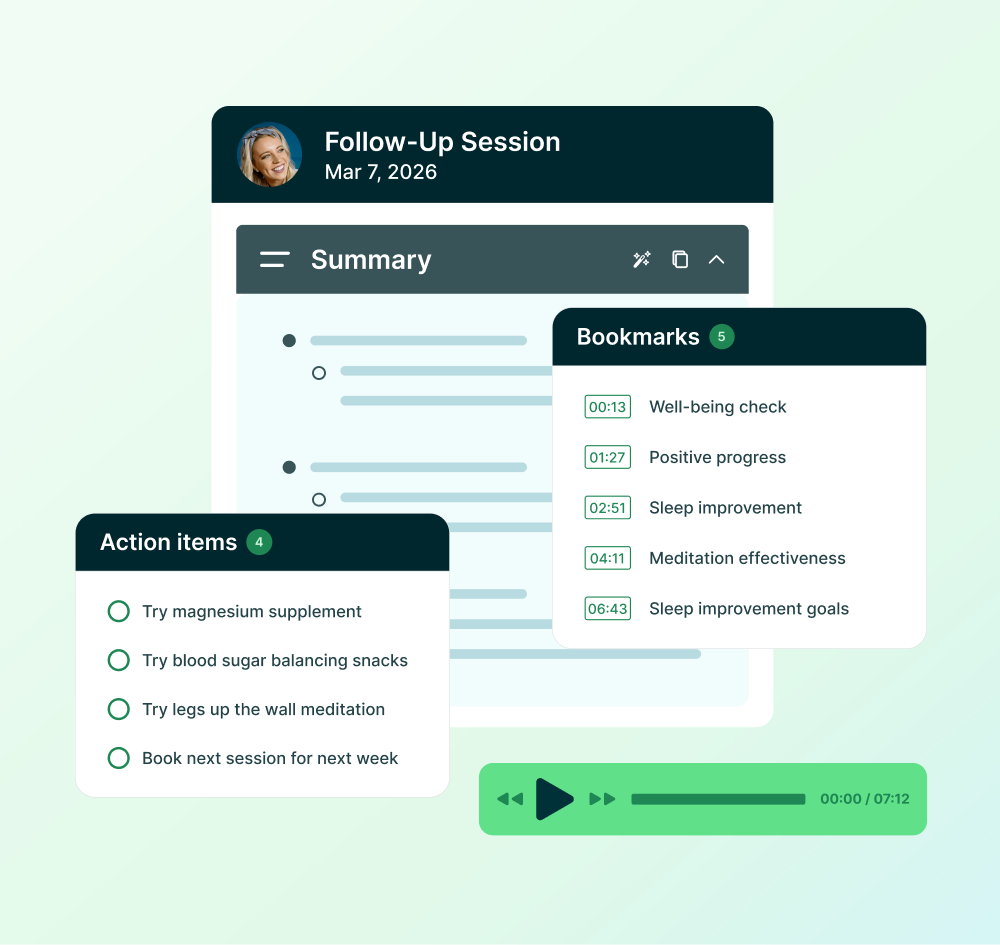
After your session ends, get an intelligent summary of key points, progress, and action items — ready to shape into your clinical note.

Customizable note formats

Turn your AI Summary into Outline, Narrative, or SOAP format in your preferred style.

Walk into every session prepared

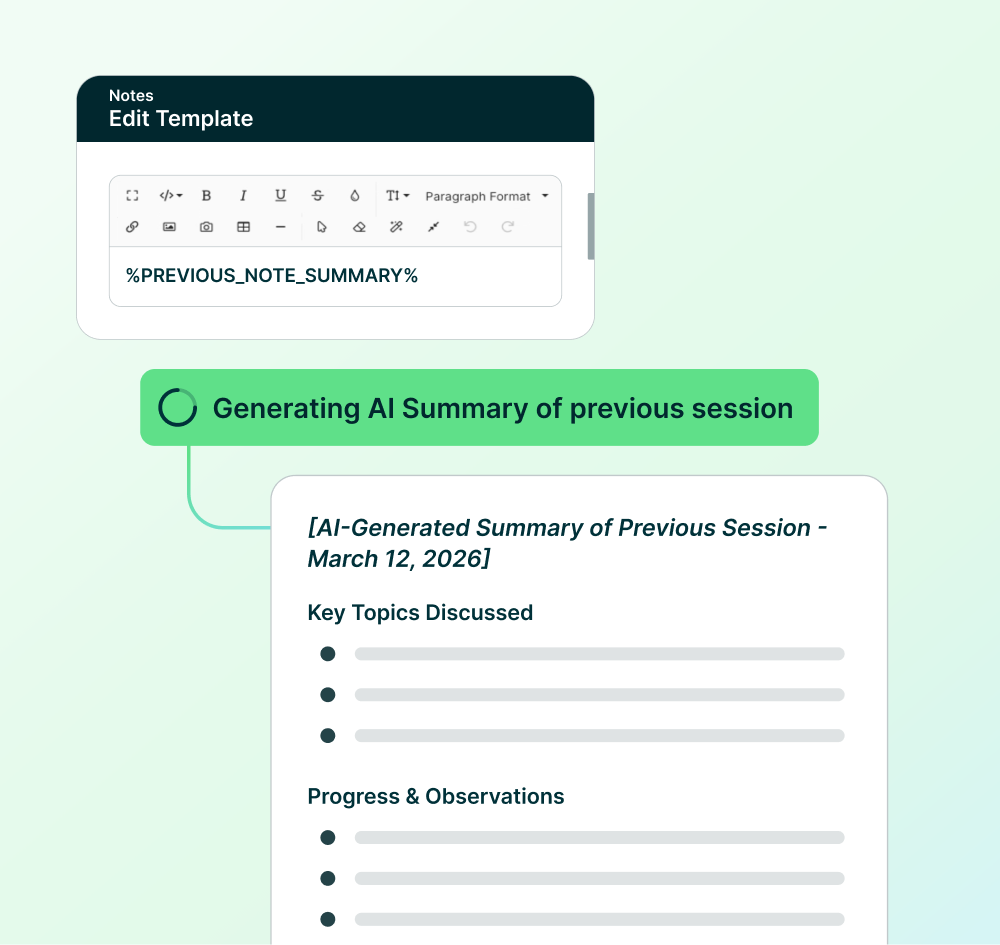
Stop digging through past notes before every session. AI Session Prep automatically inserts a smart summary of your last session into your new note, so you have context the moment you're ready to write.

Instant session context

Your last session's key points are already in your note template. No hunting. No remembering. Just start where you left off.

Pre-session confidence

Review the summary before your client arrives. You're calm, prepared, and ready to dive deeper into what matters.

Build once, automate forever

Set your AI Session Prep workflow once, and every session after takes care of itself.
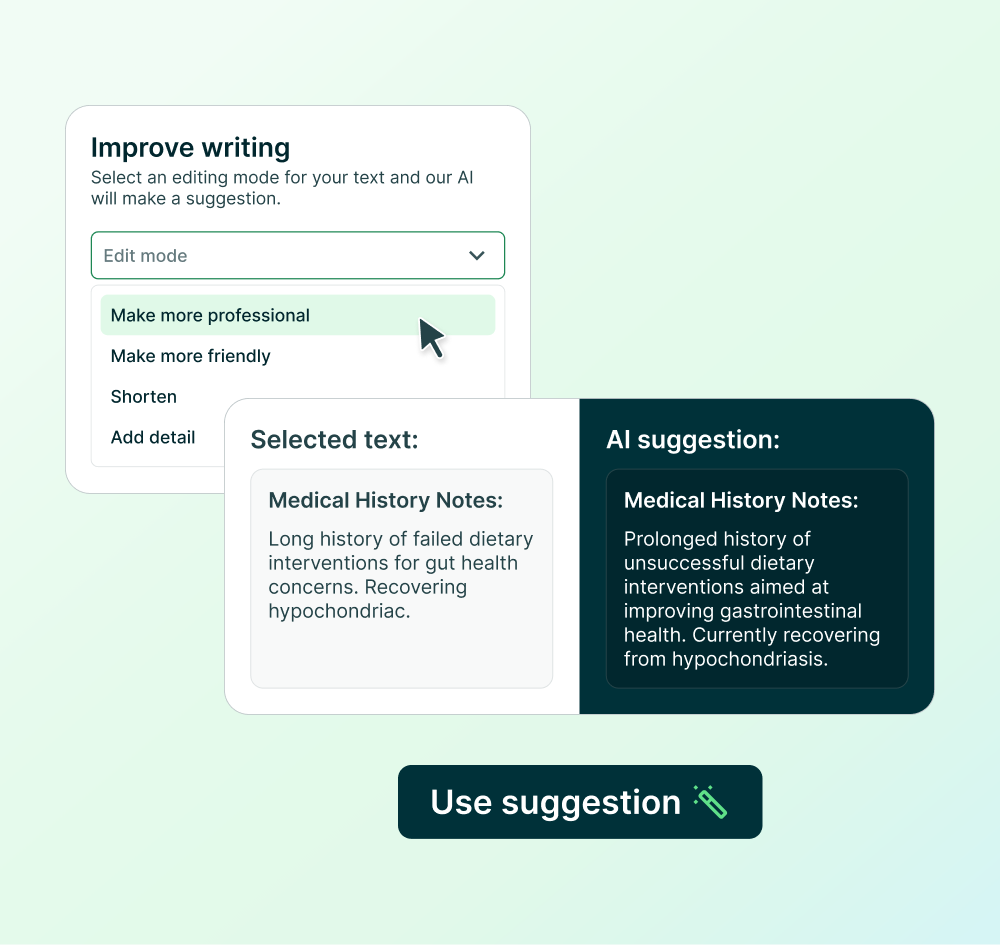
Polish your words. Keep your voice.

Writing clinical content takes time. AI Writing Assistant suggests improvements for grammar, tone, length, or detail in Session Notes, Forms, Programs, Protocols — anywhere you write in Practice Better. You review every suggestion and keep total control.

Works everywhere you write

Session Notes, intake forms, protocols, program modules — select text anywhere and get instant writing improvement options.

You're always in control

Accept, iterate, or discard suggestions. Your words, your clinical voice, your final call.

Five improvement types

Grammar, tone, length, professionalism, and detail. Pick what fits, review the suggestion, keep what works.

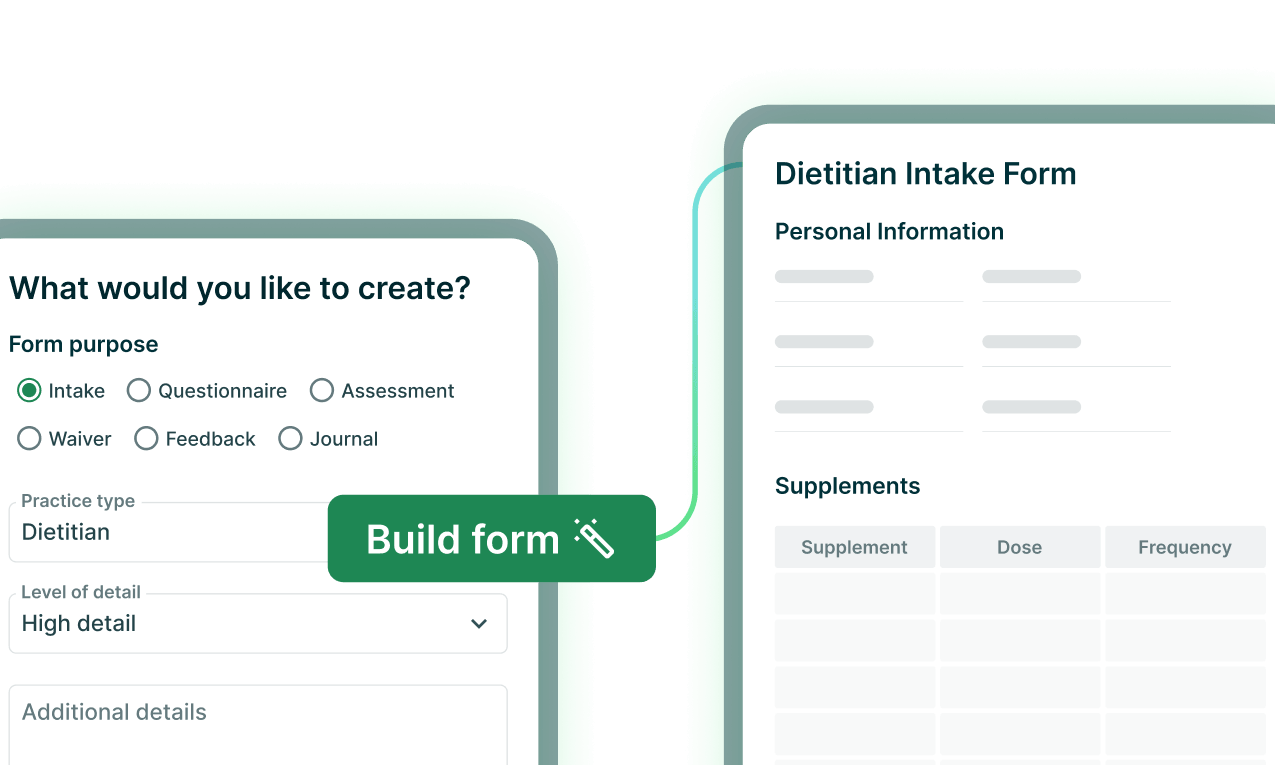
AI Form Builder
Generate intake forms in seconds
Answer a few short questions, and let Practice Better handle the hard part. Edit, fine-tune, and publish when you're ready.
Learn more
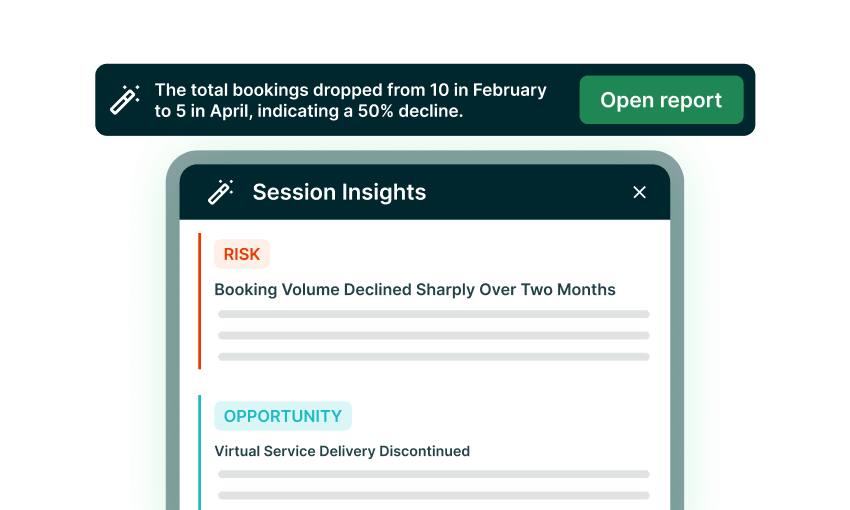
Dashboard showing session insights with risk of booking decline and opportunity of discontinued virtual service.
AI Session Insights
Surface patterns and risks from your practice data
See revenue trends, client patterns, and risk factors at a glance without manual analysis.
Learn more
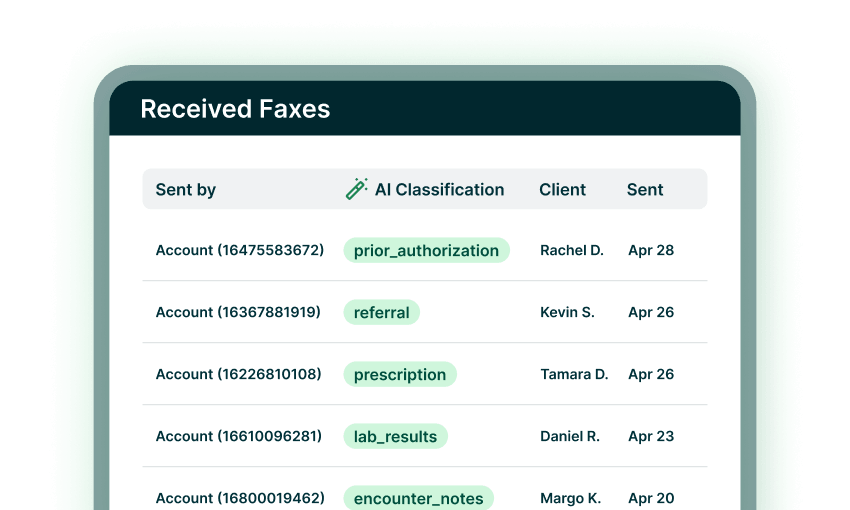
Received faxes list showing sender account, AI classification, client name, and sent date.
AI Fax Classification
Auto-tag and route incoming faxes to the right client
Faxes are tagged, matched to clients, and ready to file — no manual sorting.
Learn more
AI Program Content Generator
Draft educational content for your programs automatically
Stop staring at a blank page. Get a full content draft to review, refine, and publish.
Learn more
“Practice Better’s AI Charting Assistant has cut my note-taking time in half. My clients appreciate having a resource to refer back to as well; not having to remember everything or feeling the pressure to take their own notes.”
Candice Esposito
Naturopathic and Functional Medicine Doctor
“Practice Better’s AI Charting Assistant has completely changed my life for the better. I was never great at charting because I prefer to give my full attention to my clients. I also use ChatGPT for marketing campaigns and medical inquiries. I’m excited to explore the full potential of AI.”
Dr. Kate Tackett
Naturopathic Doctor
"Practice Better's AI-powered note-taking and playback feature is a standout—it streamlines documentation for telehealth sessions, allowing me to focus on my clients while ensuring comprehensive, accurate notes."
Tanishia Neal
National Board Certified Health & Wellness Coach/Registered Nurse
I love being able to create fillable templates and use automations to take day to day tasks off my to do list. Integrated billing is a helpful tool for our practice with offering both cash pay and insurance billings options for patients.
Michelle Riggs
Registered Dietitian Nutritionist
Everything is streamlined and user friendly. I like the features that make my charting more efficient like note templates and merging data from paperwork into a chart. It saves me so much time in charting and allows me to spend more time actually seeing clients.
Rachel Benight
Registered Dietitian
"I love all of the automations! Intake forms, session reminders, invoices and Google review requests are all sent to my clients automatically, which frees up more time for me to devote more focused time on direct client care. The tech support is also outstanding! I am able to access answers to my questions in a very expedited and accurate way. The integrated portal messenger feature allows me to communicate with my clients in a direct and focused way, which I find to be extremely advantageous, especially when providing acute care for injuries and illnesses."
Beth Bundy
Certified Classical Homeopath

Frequently asked questions

How much does this AI Charting Assistant add-on cost?

You can enable this add-on if you are on the Starter plan and up. Pricing is based on usage and billed based on the number of AI credits consumed. 2 AI credits = 1 minute of AI Summary usage. Your first 600 minutes are free; after that, each AI credit costs $0.005, which translates to $0.01/min. You can estimate your cost based on your expected usage on Practice Better’s pricing page.

What is the AI Charting Assistant?

The AI Charting Assistant is comprised of AI Summary and AI Dictation. AI Summary records, transcribes, and summarizes Practice Better Telehealth sessions, Zoom 1:1 sessions, and in-person sessions — integrated into your Session Notes in your preferred format: Bullet, Narrative, or SOAP. AI Dictation is a speech-to-text tool that captures accurate and secure notes while you talk. Both are HIPAA-compliant.

What languages does the AI Charting Assistant support?

The following languages are currently supported for recording and transcription:

Chinese, Dutch, English, French, German, Hindi, Indonesian, Italian, Japanese, Korean, Portuguese, Russian, Spanish, Swedish, Turkish, and Ukrainian.

Why would I use this add-on for telehealth if I already use Zoom AI Companion?

Practice Better's AI Charting Assistant produces summaries and action items directly inside your client-centered workflow — using your preferred note templates and integrating them into your Session Notes. You can also choose your own note format, including Narrative, Outline, and SOAP notes. The AI Charting Assistant is built specifically for health and wellness practitioners and is deeply integrated into how you run your practice.

Is my data safe and secure?

Yes. The AI Charting Assistant is HIPAA, PHIPA, PIPEDA & GDPR-compliant. Your client data is never used to train AI models.

Can I share the recording and/or transcript with my clients?

Yes. You can download the audio or transcription file and share it with them directly.

Can I disable the AI Charting Assistant?

You can turn the AI Charting Assistant off and on as you like.

What makes Practice Better a strong AI charting tool?

Practice Better's AI Charting Assistant drafts clinical notes directly from your session transcript — in whatever format you document in. Rather than transcribing after the fact or switching to a separate AI tool, you get a complete draft note generated within your existing workflow. You review, edit, and save — without starting from a blank page after back-to-back clients.

Does Practice Better replace a standalone AI note taker?

For most practitioners, yes. A standalone AI note taker gives you a transcript and a draft — but it's disconnected from your client records, care plans, and billing. Practice Better's AI Charting Assistant does the same drafting work and keeps it inside your practice management system, so your session notes are already attached to the right client the moment you save them.

What AI features does Practice Better have?

Practice Better offers a growing suite of AI-powered tools designed to reduce administrative overhead so practitioners can focus on what they do best: caring for their clients.

  • AI Charting Assistant (AI Summary + AI Dictation) — Records, transcribes, and summarizes sessions into clinical notes in your preferred format (Bullet, Narrative, or SOAP). Includes AI Dictation for hands-free, speech-to-text note capture.
  • AI Session Prep — Add a placeholder to any note template and Practice Better will automatically summarize your last session note every time you create a new one, so you walk in prepared.
  • AI Writing Assistant — Highlight any text in a Session Note, Form, Protocol, Program, and more, and choose from five improvement options. Works across your entire Practice Better account.
  • AI Form Builder — Generates customized intake forms, assessments, and questionnaires from a simple description, ready for you to review and publish.
  • AI Program Content Generator — Describe what you want to teach inside any Program module and get a full content draft ready to review and publish.
  • AI Session Insights — An AI-generated insights panel at the top of your Session History Report, surfacing trends, patterns, and risks from your practice data.
  • AI Fax Classification — Incoming faxes are automatically tagged by clinical document type and matched to the right client record, so you can triage your queue at a glance without opening every document.

All Practice Better AI features are built with HIPAA compliance and data privacy as a foundation. Your client data is never used to train AI models.

What is AI Dictation?

AI Dictation is a speech-to-text tool built into the AI Charting Assistant that converts your spoken words into written notes in real time, no typing required. Unlike AI Summary, which records your full session and generates a structured clinical note from the transcript, AI Dictation transcribes exactly what you say as you say it, giving you direct control over your documentation. It's HIPAA-compliant and included with the AI Charting Assistant add-on, available on Starter plans and up.

What is AI Session Prep?

AI Session Prep automatically pulls a concise recap of a client's most recent session note directly into any new note you create, including key topics discussed, progress and observations, action items, and the plan from your last session. No more scrolling back through records before appointments; the context you need is already there when you open the note. It works with Session Notes written manually or with the AI Charting Assistant. On Team plans, the summary is based on your own previous Session Notes for that client. This feature is available on all paid plans.

What is the AI Writing Assistant?

The AI Writing Assistant is built directly into the rich text editor across Practice Better — in Session Notes, Forms, Protocols, Programs, and more. Select any block of text and choose from five improvement types: correct spelling and grammar, make more professional, make more friendly, shorten, or add detail. The AI shows you a suggested rewrite alongside your original so you can accept it, iterate on it, or discard it entirely. As with all AI-generated content, we recommend reviewing suggestions before using them. This feature is available on all paid plans.

What is AI Form Builder?

AI Form Builder generates a complete form or waiver in seconds from a simple description. Specify the type of form, your practice type, the level of detail, and any specific sections or questions you want included, and Practice Better produces a ready-to-customize draft. From there, you can reorder sections, add or remove questions, and adjust response formats before publishing. This feature is included on all paid plans, and anyone on your team with access to edit Forms can use it. As with all AI-generated content, review your form for accuracy and compliance with your local regulatory body before publishing. The output is a starting point, not a validated clinical questionnaire.

What is AI Program Content Generator?

AI Program Content Generator is a content generator built into the Programs feature of Practice Better. Describe the topic you want to teach — including the type of clients in your program and the level of detail you want — and Practice Better generates a full content draft you can preview and add to your module without replacing anything you've already written. As with all AI-generated content, treat it as a starting point to refine with your own clinical expertise before publishing. This feature is available on Plus plans and up for Evergreen and Self-Paced Programs, and Pro plans and up for Fixed-Date Programs.

What is AI Session Insights?

AI Session Insights adds an AI-generated insights panel to your Session History Report, surfacing patterns across your practice data that are easy to miss day-to-day. Insights are organized into three categories — Risk, Opportunity, and Issue — and can highlight, for example, revenue concentration across clients or demand trends for specific services. You can refresh the insights at any time or open a full breakdown report for more detail. This feature is available on all paid plans.

What is AI Fax Classification?

AI Fax Classification automatically reads and categorizes incoming faxes as soon as they arrive in Practice Better, tagging each one with a clinical document type — such as lab results, referral, prescription, prior authorization, or discharge summary — so you can see at a glance what's in your queue without opening every document. It also detects the patient name on the fax and matches it to an existing client record, making it easy to move the document directly into the right client's file. Tags can be adjusted at any time if you want to recategorize a fax. All fax data is handled with the same HIPAA-compliant privacy and security standards as all other clinical information in Practice Better. This feature is available on Plus plans and up. 

See the difference AI can make in your practice today

Try any paid plan free.