With Nutrition Planning from Practice Better, it doesn't.
For many practitioners, nutrition planning happens everywhere except where the client lives. A plan starts in a Google Doc, becomes a PDF, and goes out by email. When a client needs a change, you start over.
Nutrition Planning is meal planning software for dietitians, nutritionists, and health coaches, built right into Practice Better. Build custom meal plans from over 8,000 recipes created and tested by professional recipe developers. Personalize plans for the client, share it in a few clicks, and if something changes later, edit the plan so your client sees the update.
Limited-time offer: 35% off your first 2 months. Add Nutrition Planning by December 31, 2026 and pay $9.75/month per practitioner instead of $15/month.* Add Nutrition Planning | Try a free demo
Already a Practice Better customer? Add Nutrition Planning to your account from My Subscription > My Add-ons.
New to Practice Better? Start your free trial to see it in action.
Nutrition Planning is a fully integrated meal planning workflow inside Practice Better. It works in three parts:
If you guide clients on what to eat, it's built for you:
Let's be honest: you didn't become a practitioner to reformat meal plans. Nutrition Planning is built to take the repetitive parts off your plate, so your time goes to the client in front of you.
Every plan draws on a library of 8,000+ recipes and 150+ plan templates, all created, tested, and photographed by professional recipe developers. New recipes are added regularly, so the library keeps growing and your clients stay engaged over time. Preview any template before you use it, including an Evidence tab that shows the research behind it. Set a meal plan's dietary preferences, exclusions, and cultural preferences, and recipe search, suggestions, and swaps follow them, so you see recipes that fit your client. Save time and build plans with confidence.
If you'd rather build your own, start with a blank meal plan or duplicate an existing meal plan. Each client's nutrition plan can hold multiple weekly meal plans, so you can build a new week whenever your client needs one.
Every plan stays fully editable, so you stay in control. Nutrition Planning supports your expertise and clinical judgment. It doesn't replace them.
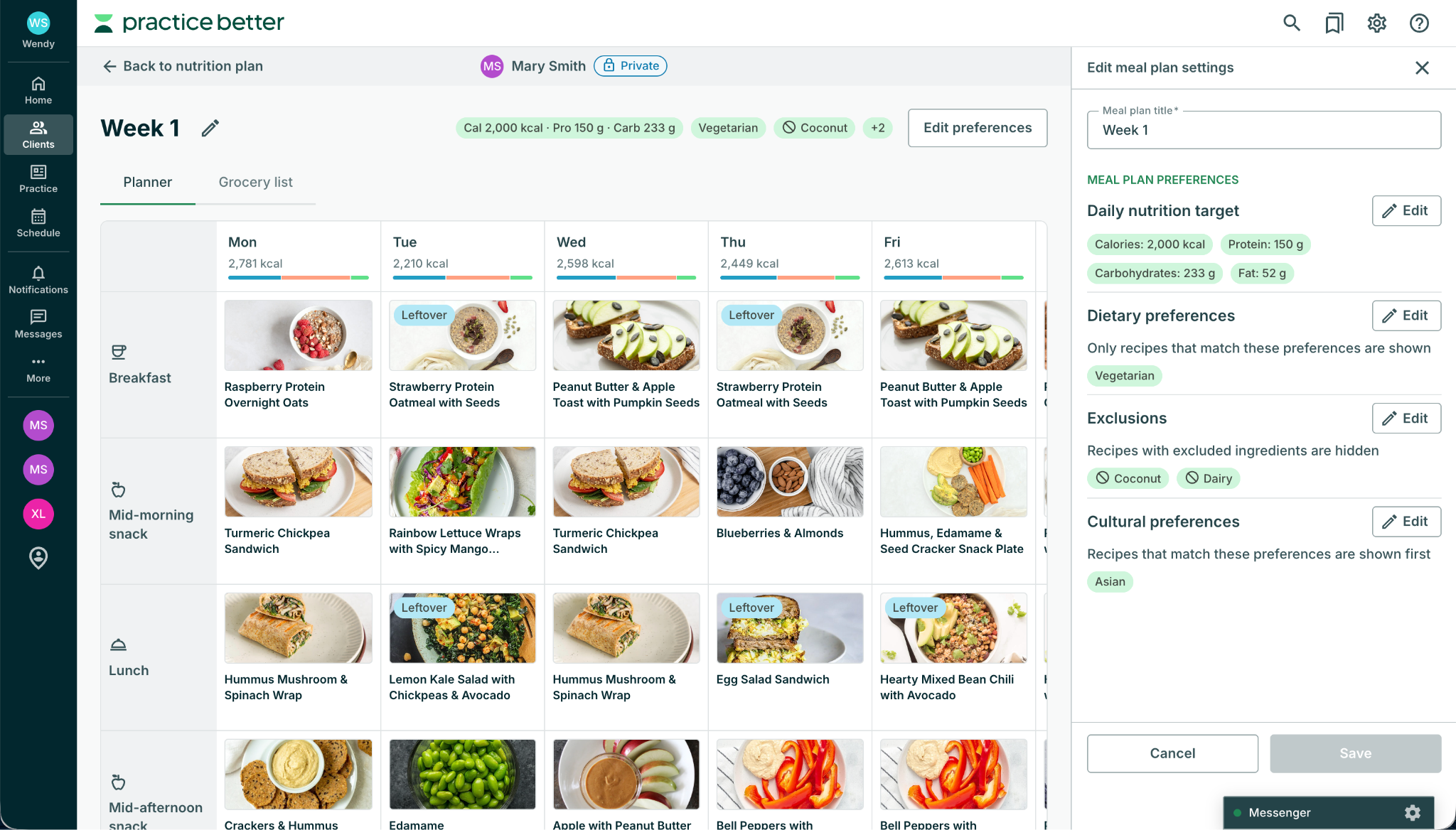
No two clients eat the same way. A plan built around the individual helps clients feel seen, heard, and cared for. Inside the planner, you can:
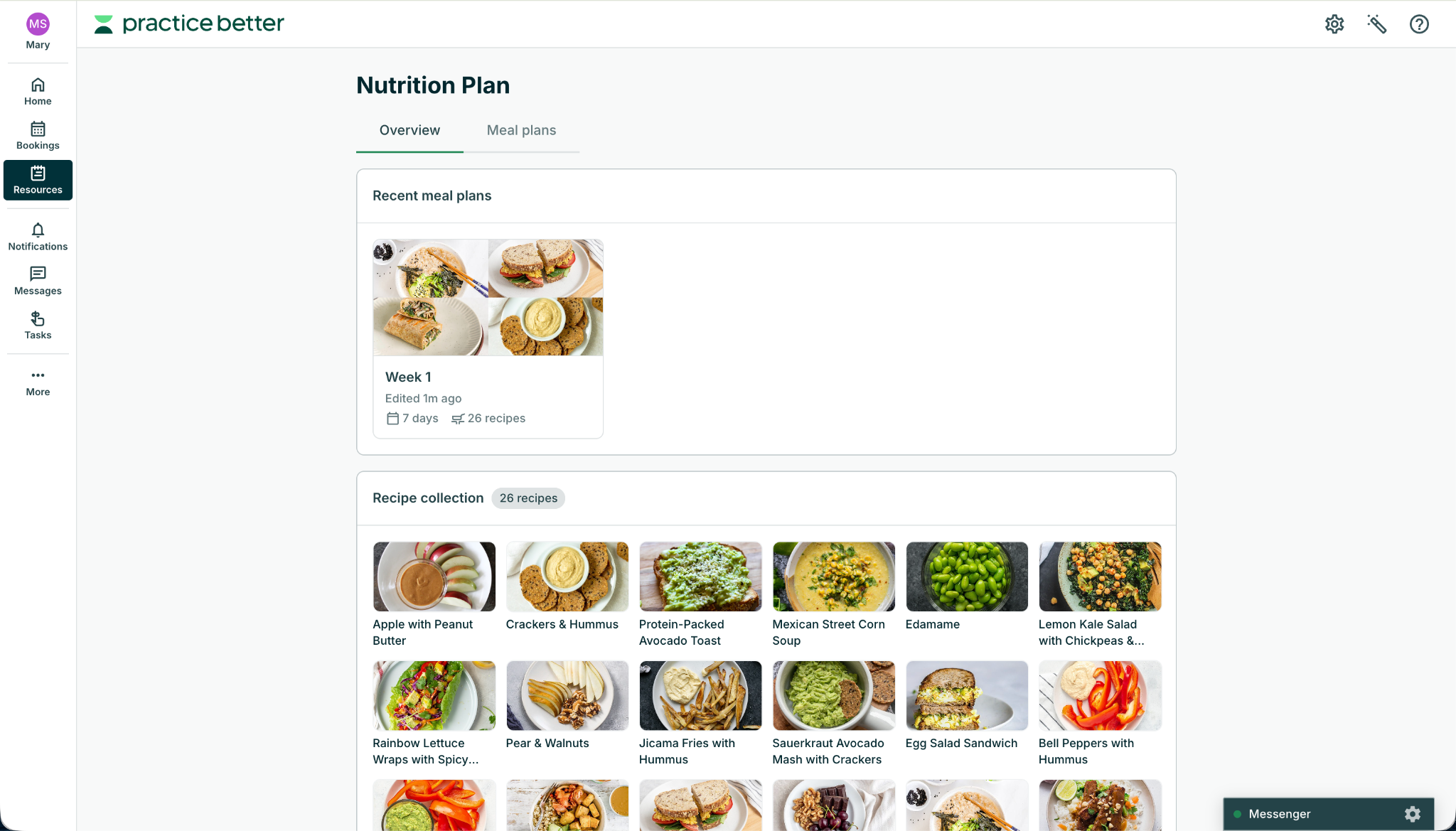
Clients see their plan and recipe details right inside Practice Better, with ingredients, directions, and servings for every meal. A daily nutrition summary shows how each day adds up, and every meal plan comes with its own grocery list.
When you share a plan, its recipes appear in your client's Food & Mood Journal under Shared Recipes, which makes it simple to log what they're eating against the plan. A plan that's easy to open, shop from, and log against is easier to follow, and clients do it all in the portal they already use, with no separate app or login.
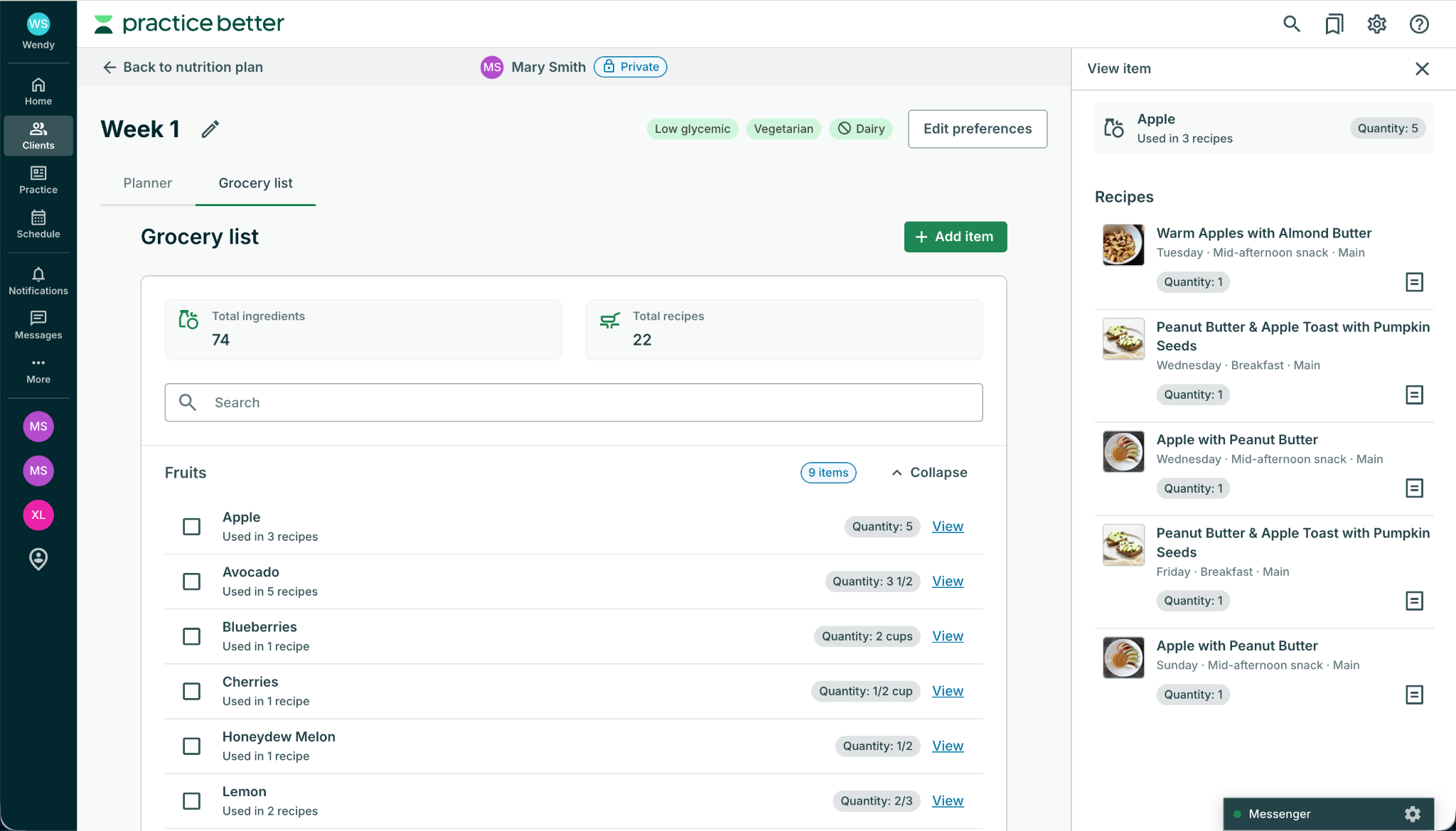
Every meal plan comes with its own grocery list, built from the recipes in it and grouped by store section, such as produce or dairy. The list updates right away when you add, swap, or remove a recipe, or change its servings. Quantities are based on each recipe's servings to cook, and recipes marked as leftover aren't counted again, so their ingredients aren't doubled.
Need to add something the recipes don't cover? Add custom items, such as pantry staples or a brand your client prefers, with your own quantity, unit, and category. When you share the nutrition plan, the grocery list is shared automatically. Your client can see every item, including your custom items and the items you've checked off, and which recipes use each ingredient.
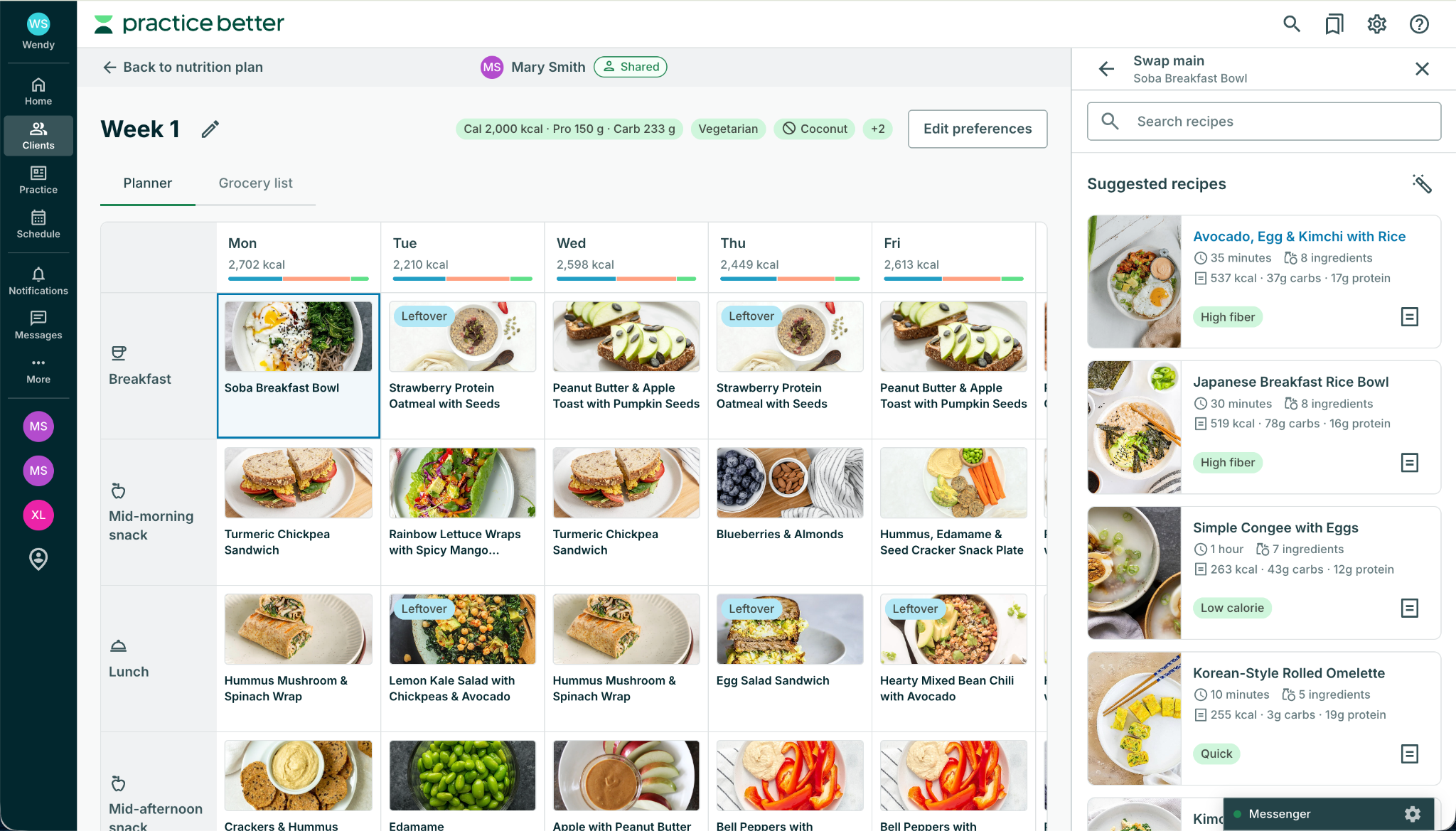
Plans change. A client travels, a preference shifts, or a recipe just isn't working. With Nutrition Planning, you edit the plan and the client sees the change. There's no duplicating the whole plan and no resending a PDF.
A meal planning tool that lives outside your practice software means another login, another subscription, and client details entered twice. Nutrition Planning lives in the client record you already use: same client, same portal, same subscription.
Ready to stop reformatting meal plans? See how Nutrition Planning works, then add it by December 31 for 35% off your first 2 months.* Try a free demo
Nutrition Planning fits into the client record you already use. Below is a quick walkthrough in five steps. For detailed instructions, see the Getting Started with Nutrition Planning help article.
Nutrition Planning is available as an add-on on all paid plans (Starter plan and above), and the account owner purchases it. Each practitioner or admin who creates or edits meal plans needs a seat. At $15/month per practitioner, that's about 50 cents a day.
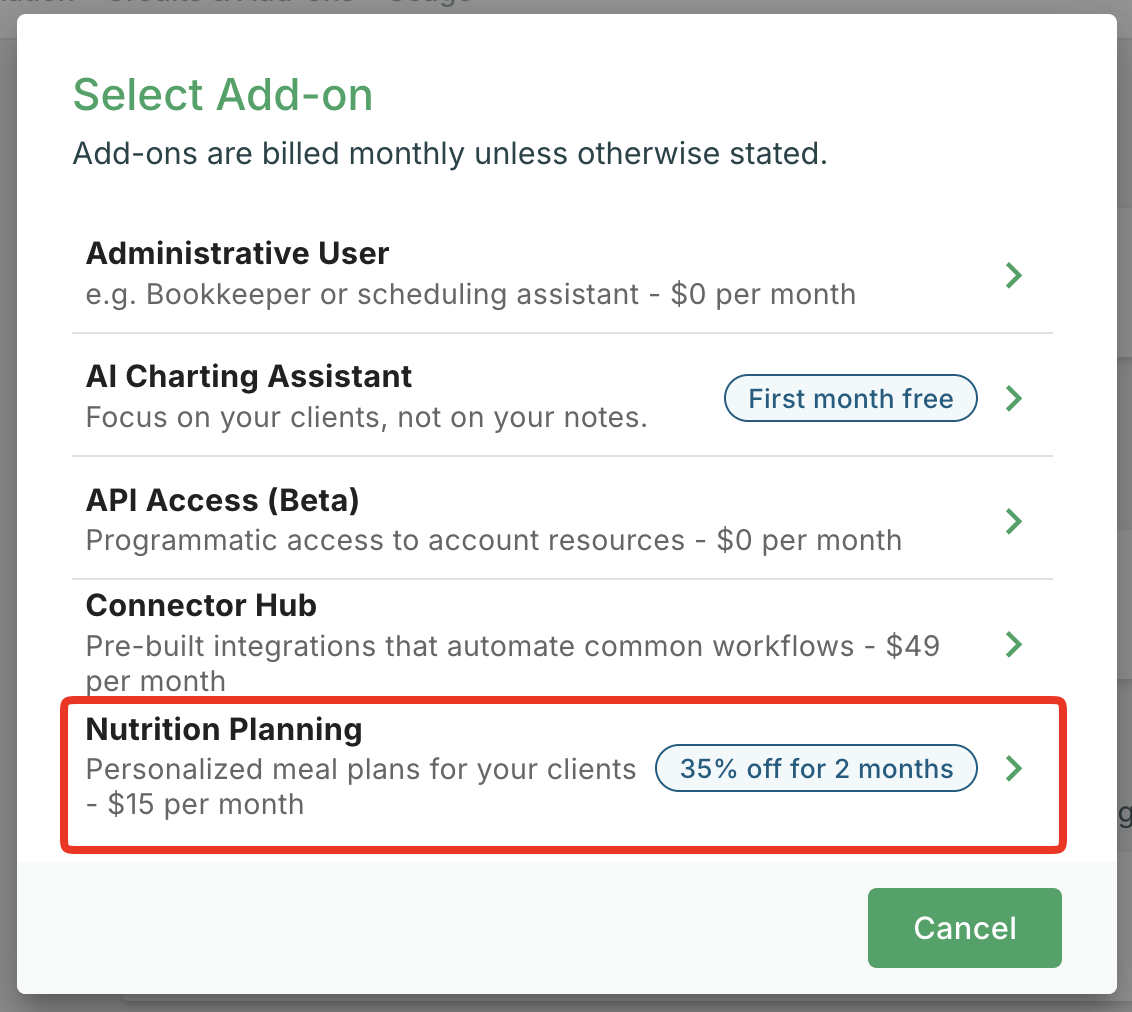
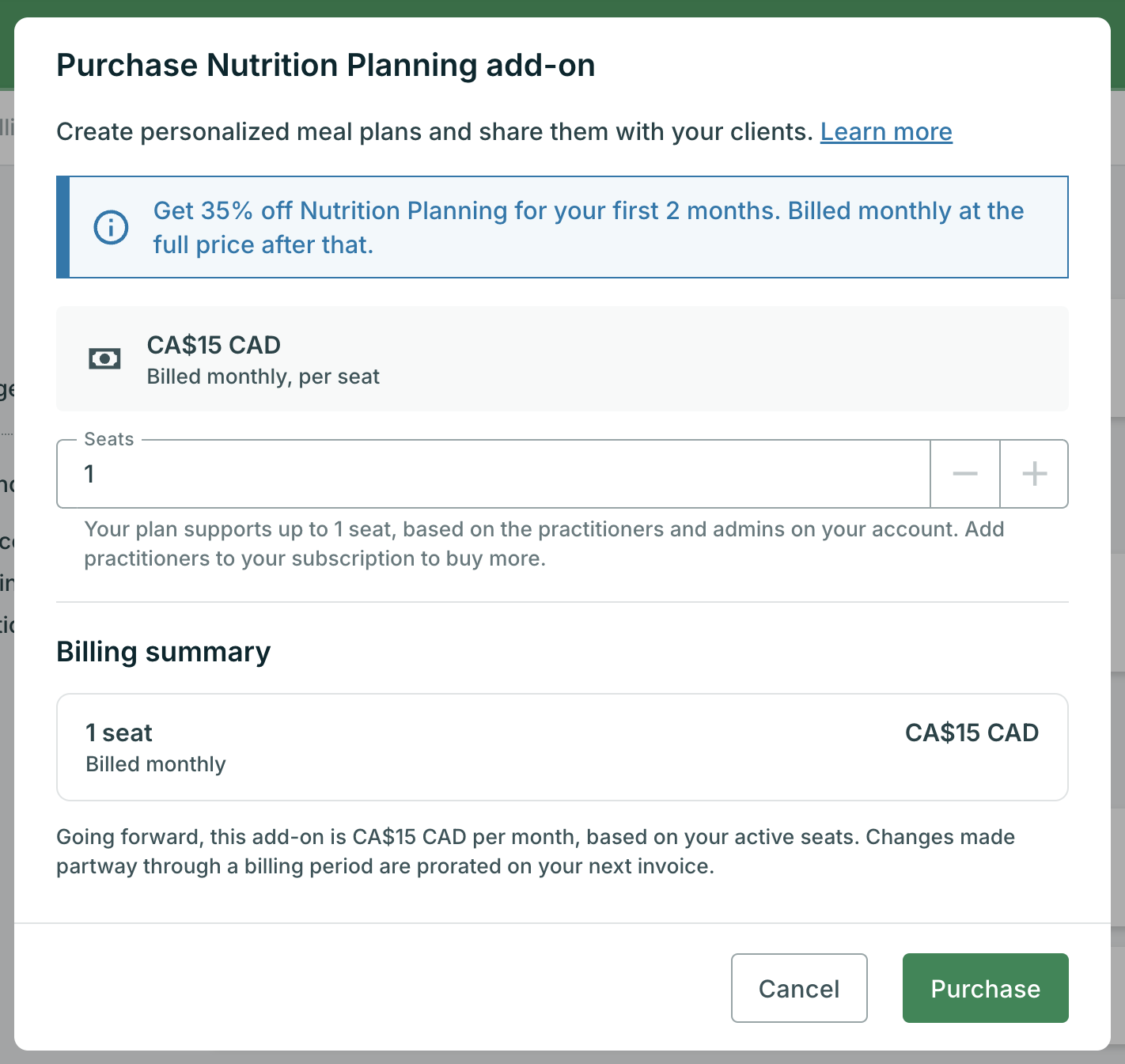
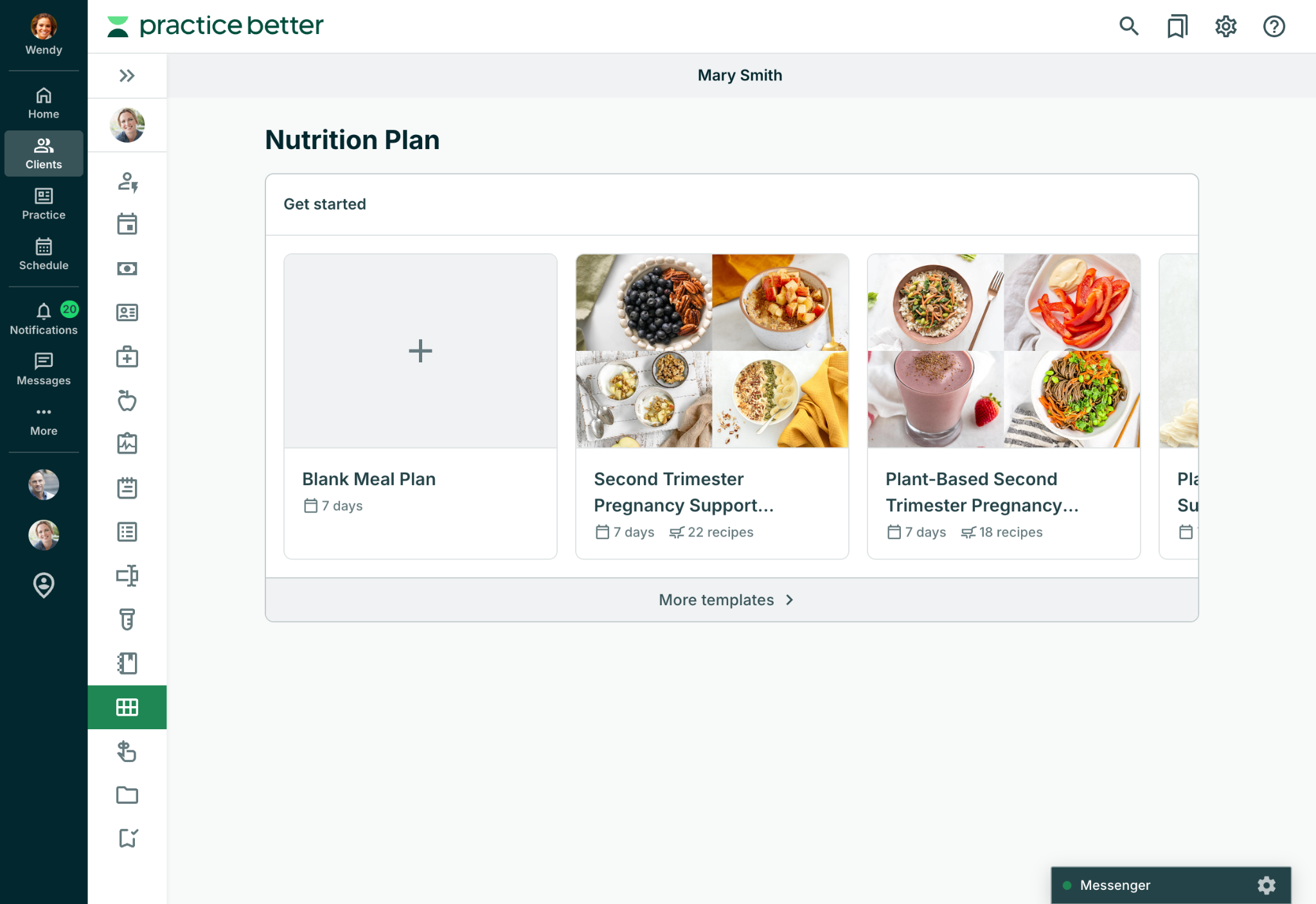
Go to your Clients, open a client record, and select the Nutrition Plan section. On the Get started screen, choose Blank Meal Plan, or select More templates to browse. Give the meal plan a name that makes sense to you and your client. To add another week later, select New meal plan or duplicate an existing one.
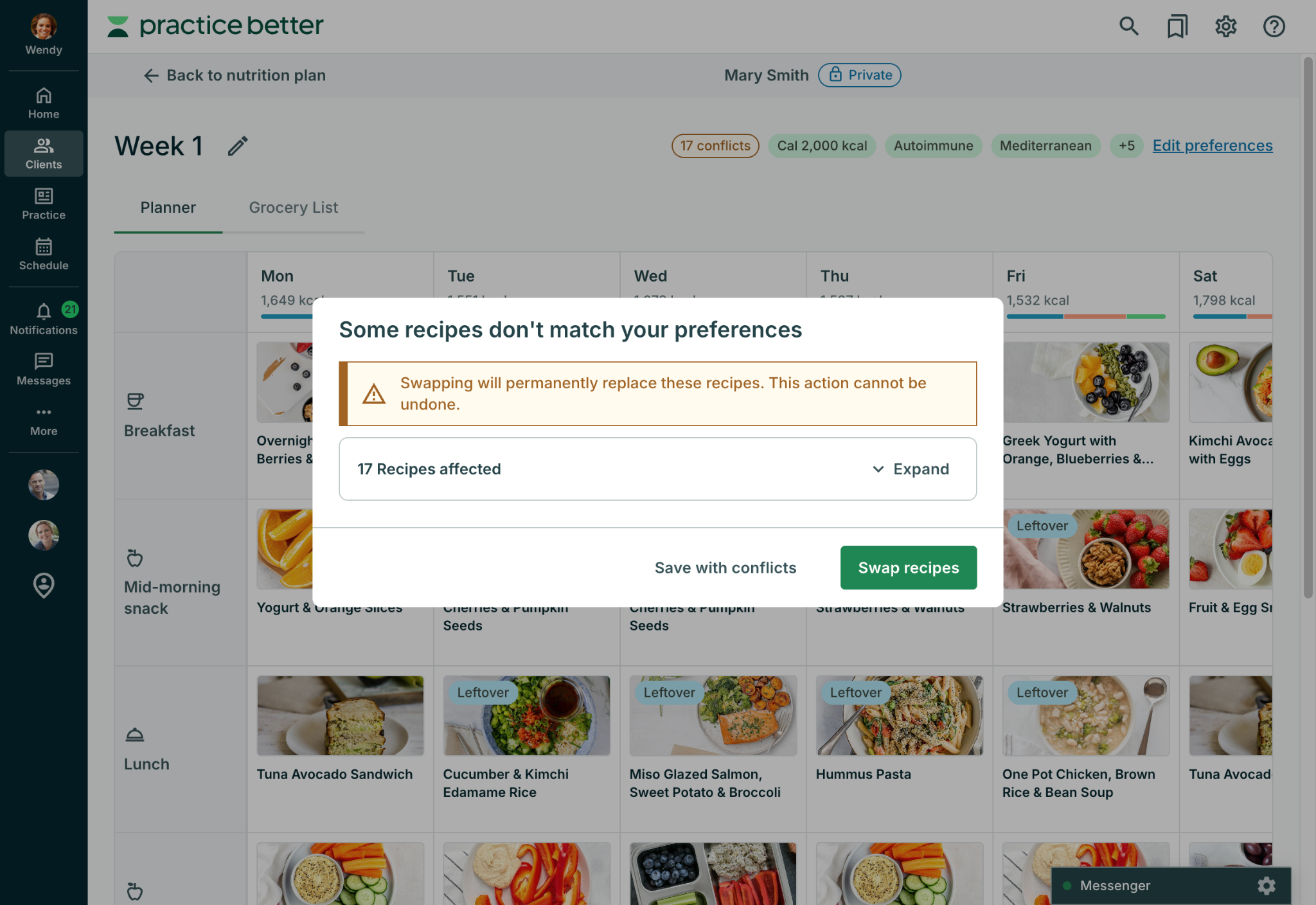
Open a meal plan and select Edit preferences. Add daily nutrition targets, dietary preferences, exclusions, and cultural preferences. These apply to that meal plan, and recipe search and swaps follow them. If a recipe already in the plan conflicts with a preference, Practice Better flags it so you can swap it or save the plan with the conflict. From there, add or swap recipes, and adjust servings and portions until the plan fits.
Check the daily nutrition summary to see how each day compares to your targets. Then open the meal plan’s Grocery List tab, review the ingredients, and add any custom items.
Select the Share icon on the client's Nutrition Plan page, choose Share with client, and decide whether to notify them. Your client can view every meal plan, its recipe details, and its grocery list in read-only form from their Client Portal on web or mobile. Need to make a change later? Edit the plan, and the client sees the update.
Nutrition Planning is available as an add-on on any paid plan (Starter plan and above).
The regular price is $15/month per practitioner. If you add Nutrition Planning by December 31, 2026 at 11:59 pm ET, you’ll get 35% off. Offer applied automatically at purchase. After 2 months, the regular price of $15/month per practitioner applies. Taxes are not included.*
Yes. Update the plan at any time, and your client sees the latest version.
Yes. You can start from a template, a blank meal plan, or a copy of an existing meal plan, and each client can have multiple weekly meal plans.
Yes. Team members need a Nutrition Planning seat to create or edit meal plans, and permissions control whether team members and admins can create, modify, share, or delete a client's nutrition plan.
Yes. Practitioners can hide nutrition information from a client's plans and recipes, using the same setting as the client's journal.
Clients view their plans, recipes, and grocery lists inside Practice Better, on web or mobile. They don't need a separate app or login.
How does the grocery list work?
Each meal plan has its own grocery list, built from its recipes and grouped by store section. It updates when you add, swap, or remove a recipe, or change servings, and you can add custom items. It's shared with your client automatically when you share the nutrition plan.
Does my client see changes right away?
Yes. Your client sees changes as you make them, including edits to a meal plan you're still working on, and sharing applies to every meal plan in the nutrition plan. Switch the plan back to Private at any time to stop sharing.
We think you'll love Nutrition Planning. Add it by December 31 to lock in the limited-time offer, then start building plans without ever leaving the client record.*
Try a free demo | Add Nutrition Planning
Practice Better is the complete practice management platform for health and wellness professionals. Power your practice and start your free trial today.
Build your dream practice with a modern, all-in-one EHR that supports the holistic health of your clients and your business.
{{free-trial-simple-text}}
*Offer ends December 31, 2026 at 11:59 PM ET. Valid for customers adding Nutrition Planning to their account. Get 35% off per practitioner ($9.75/month) for the first 2 months from your purchase date, applied automatically. After that, the regular price of $15/month per practitioner applies. Excludes taxes.

With Nutrition Planning from Practice Better, it doesn't.
For many practitioners, nutrition planning happens everywhere except where the client lives. A plan starts in a Google Doc, becomes a PDF, and goes out by email. When a client needs a change, you start over.
Nutrition Planning is meal planning software for dietitians, nutritionists, and health coaches, built right into Practice Better. Build custom meal plans from over 8,000 recipes created and tested by professional recipe developers. Personalize plans for the client, share it in a few clicks, and if something changes later, edit the plan so your client sees the update.
Limited-time offer: 35% off your first 2 months. Add Nutrition Planning by December 31, 2026 and pay $9.75/month per practitioner instead of $15/month.* Add Nutrition Planning | Try a free demo
Already a Practice Better customer? Add Nutrition Planning to your account from My Subscription > My Add-ons.
New to Practice Better? Start your free trial to see it in action.
Nutrition Planning is a fully integrated meal planning workflow inside Practice Better. It works in three parts:
If you guide clients on what to eat, it's built for you:
Let's be honest: you didn't become a practitioner to reformat meal plans. Nutrition Planning is built to take the repetitive parts off your plate, so your time goes to the client in front of you.
Every plan draws on a library of 8,000+ recipes and 150+ plan templates, all created, tested, and photographed by professional recipe developers. New recipes are added regularly, so the library keeps growing and your clients stay engaged over time. Preview any template before you use it, including an Evidence tab that shows the research behind it. Set a meal plan's dietary preferences, exclusions, and cultural preferences, and recipe search, suggestions, and swaps follow them, so you see recipes that fit your client. Save time and build plans with confidence.
If you'd rather build your own, start with a blank meal plan or duplicate an existing meal plan. Each client's nutrition plan can hold multiple weekly meal plans, so you can build a new week whenever your client needs one.
Every plan stays fully editable, so you stay in control. Nutrition Planning supports your expertise and clinical judgment. It doesn't replace them.
No two clients eat the same way. A plan built around the individual helps clients feel seen, heard, and cared for. Inside the planner, you can:
Clients see their plan and recipe details right inside Practice Better, with ingredients, directions, and servings for every meal. A daily nutrition summary shows how each day adds up, and every meal plan comes with its own grocery list.
When you share a plan, its recipes appear in your client's Food & Mood Journal under Shared Recipes, which makes it simple to log what they're eating against the plan. A plan that's easy to open, shop from, and log against is easier to follow, and clients do it all in the portal they already use, with no separate app or login.
Every meal plan comes with its own grocery list, built from the recipes in it and grouped by store section, such as produce or dairy. The list updates right away when you add, swap, or remove a recipe, or change its servings. Quantities are based on each recipe's servings to cook, and recipes marked as leftover aren't counted again, so their ingredients aren't doubled.
Need to add something the recipes don't cover? Add custom items, such as pantry staples or a brand your client prefers, with your own quantity, unit, and category. When you share the nutrition plan, the grocery list is shared automatically. Your client can see every item, including your custom items and the items you've checked off, and which recipes use each ingredient.
Plans change. A client travels, a preference shifts, or a recipe just isn't working. With Nutrition Planning, you edit the plan and the client sees the change. There's no duplicating the whole plan and no resending a PDF.
A meal planning tool that lives outside your practice software means another login, another subscription, and client details entered twice. Nutrition Planning lives in the client record you already use: same client, same portal, same subscription.
Ready to stop reformatting meal plans? See how Nutrition Planning works, then add it by December 31 for 35% off your first 2 months.* Try a free demo
Nutrition Planning fits into the client record you already use. Below is a quick walkthrough in five steps. For detailed instructions, see the Getting Started with Nutrition Planning help article.
Nutrition Planning is available as an add-on on all paid plans (Starter plan and above), and the account owner purchases it. Each practitioner or admin who creates or edits meal plans needs a seat. At $15/month per practitioner, that's about 50 cents a day.
Go to your Clients, open a client record, and select the Nutrition Plan section. On the Get started screen, choose Blank Meal Plan, or select More templates to browse. Give the meal plan a name that makes sense to you and your client. To add another week later, select New meal plan or duplicate an existing one.
Open a meal plan and select Edit preferences. Add daily nutrition targets, dietary preferences, exclusions, and cultural preferences. These apply to that meal plan, and recipe search and swaps follow them. If a recipe already in the plan conflicts with a preference, Practice Better flags it so you can swap it or save the plan with the conflict. From there, add or swap recipes, and adjust servings and portions until the plan fits.
Check the daily nutrition summary to see how each day compares to your targets. Then open the meal plan’s Grocery List tab, review the ingredients, and add any custom items.
Select the Share icon on the client's Nutrition Plan page, choose Share with client, and decide whether to notify them. Your client can view every meal plan, its recipe details, and its grocery list in read-only form from their Client Portal on web or mobile. Need to make a change later? Edit the plan, and the client sees the update.
Nutrition Planning is available as an add-on on any paid plan (Starter plan and above).
The regular price is $15/month per practitioner. If you add Nutrition Planning by December 31, 2026 at 11:59 pm ET, you’ll get 35% off. Offer applied automatically at purchase. After 2 months, the regular price of $15/month per practitioner applies. Taxes are not included.*
Yes. Update the plan at any time, and your client sees the latest version.
Yes. You can start from a template, a blank meal plan, or a copy of an existing meal plan, and each client can have multiple weekly meal plans.
Yes. Team members need a Nutrition Planning seat to create or edit meal plans, and permissions control whether team members and admins can create, modify, share, or delete a client's nutrition plan.
Yes. Practitioners can hide nutrition information from a client's plans and recipes, using the same setting as the client's journal.
Clients view their plans, recipes, and grocery lists inside Practice Better, on web or mobile. They don't need a separate app or login.
How does the grocery list work?
Each meal plan has its own grocery list, built from its recipes and grouped by store section. It updates when you add, swap, or remove a recipe, or change servings, and you can add custom items. It's shared with your client automatically when you share the nutrition plan.
Does my client see changes right away?
Yes. Your client sees changes as you make them, including edits to a meal plan you're still working on, and sharing applies to every meal plan in the nutrition plan. Switch the plan back to Private at any time to stop sharing.
We think you'll love Nutrition Planning. Add it by December 31 to lock in the limited-time offer, then start building plans without ever leaving the client record.*
Try a free demo | Add Nutrition Planning
Practice Better is the complete practice management platform for health and wellness professionals. Power your practice and start your free trial today.
Build your dream practice with a modern, all-in-one EHR that supports the holistic health of your clients and your business.
{{free-trial-simple-text}}
*Offer ends December 31, 2026 at 11:59 PM ET. Valid for customers adding Nutrition Planning to their account. Get 35% off per practitioner ($9.75/month) for the first 2 months from your purchase date, applied automatically. After that, the regular price of $15/month per practitioner applies. Excludes taxes.