A new client books with you. Before your first session, you've added them to QuickBooks, dropped their email into Mailchimp, logged them in your tracking spreadsheet, and sent a welcome note.
That's four tasks for one client. You didn't become a practitioner to be a part-time data entry clerk.
Connector Hub connects Practice Better to the tools you already use, so the right things happen automatically every time a client is added, books, buys a package, or joins a program. It's HIPAA-compliant, it's built right into your Practice Better account, and there's no code involved.
Here's what that means for your practice.
Every record you stop re-typing is time you can put toward your craft, your clients, or your evenings. Set a workflow up once, and it runs every time, in the background.
You decide which events trigger which actions. Nothing happens that you didn't choose.
Your clients trust you with sensitive information. General-purpose automation tools weren't built with healthcare in mind, which can leave you choosing between saving time and protecting your clients.
Connector Hub removes that choice. It's built on HIPAA-compliant infrastructure, and data is transmitted securely.
When a connector is active, Practice Better shares the relevant client information that workflow needs, typically client demographics plus details specific to the action, like session information for a booking. You stay in control: turn any workflow off, edit it, or unlink an app at any time.
You're mid-session when a new client signs up. With Connector Hub, they can get a welcome email from your own Gmail, land in the right Mailchimp tag, and be added to a HubSpot list or workflow without you lifting a finger.
Your client feels looked after from minute one. You don't have to remember a thing.
When your tools update from the same starting point, you stop wondering which spreadsheet has the right phone number or whether that new client made it into your accounting software. Fewer manual entries means fewer errors to clean up later.
Adding clients, or practitioners, usually means adding admin. Connector Hub is designed so your workflows keep up. On a Team plan, the practice owner connects each app once, and practitioners complete their own settings where an app needs them, like choosing their Mailchimp audience, spreadsheet, or Outlook calendar.
{{free-trial-simple-text}}
Connector Hub works with 11 apps at launch. Here's what a few common combinations can look like in your practice.
When a new client signs up
Create a contact in HubSpot, add or update them as a subscriber in Mailchimp, send a welcome email from Gmail, and add a row to Google Sheets. Four steps, zero typing.
When a client books a session
Send a meeting invite in Outlook, create a prep document from your own template in Google Docs, and add a customer record in QuickBooks or a contact in Xero so your accounting software is ready when you are.
When a client buys a package or enrolls in a program
Tag them in Mailchimp, add them to a HubSpot list or workflow, or add them to a Salesforce Campaign so your onboarding or nurture follows automatically.
When it's time to close the books
Export payment history and transaction statements to Excel for your bookkeeper, and let OneDrive back up client documents to the right client folder as they're uploaded.
Some of these also work in reverse. A new customer in QuickBooks or a new contact in Xero can show up in Practice Better as a client, and new Mailchimp subscribers or HubSpot list contacts can be added as clients too.
See every workflow in the Available Apps and Workflows in Connector Hub help article.
If you're a solo practitioner on Plus, you're likely the one doing all of this by hand. Connector Hub takes the repeat work off your plate so you can grow your client list without growing your to-do list.
If you run a team, consistency matters as much as time. Connector Hub gives your whole practice a shared way to keep your accounting, email, CRM, and documents in step, without asking every practitioner to do it manually.
If you're evaluating Practice Better, this is what "all-in-one" looks like when your business runs on more than one tool. Your platform and your stack, working together.
You'll need an active account with each app you want to connect. Connector Hub is a $49/month add-on for Plus and Team plans.
1. Add Connector Hub
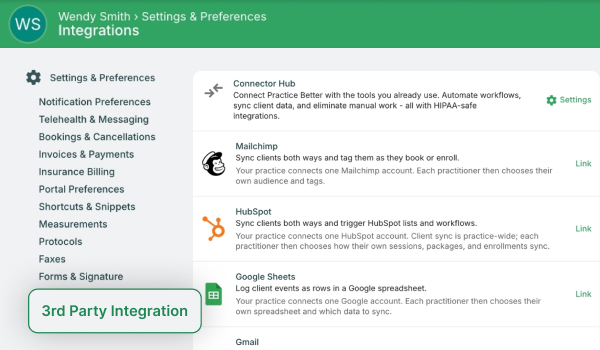
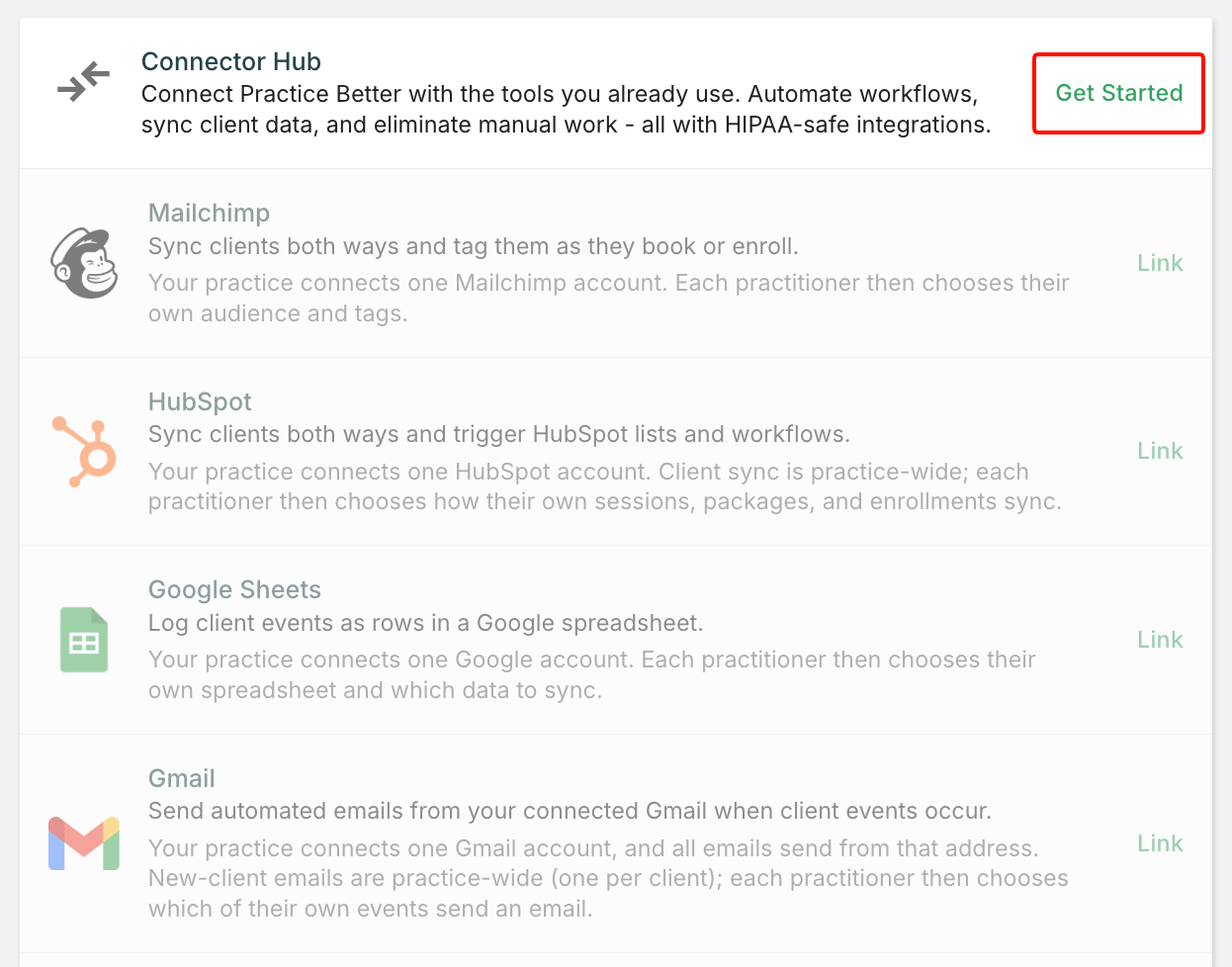
Go to Settings > 3rd Party Integrations, click Get Started next to Connector Hub, and confirm the add-on purchase.
2. Link an app
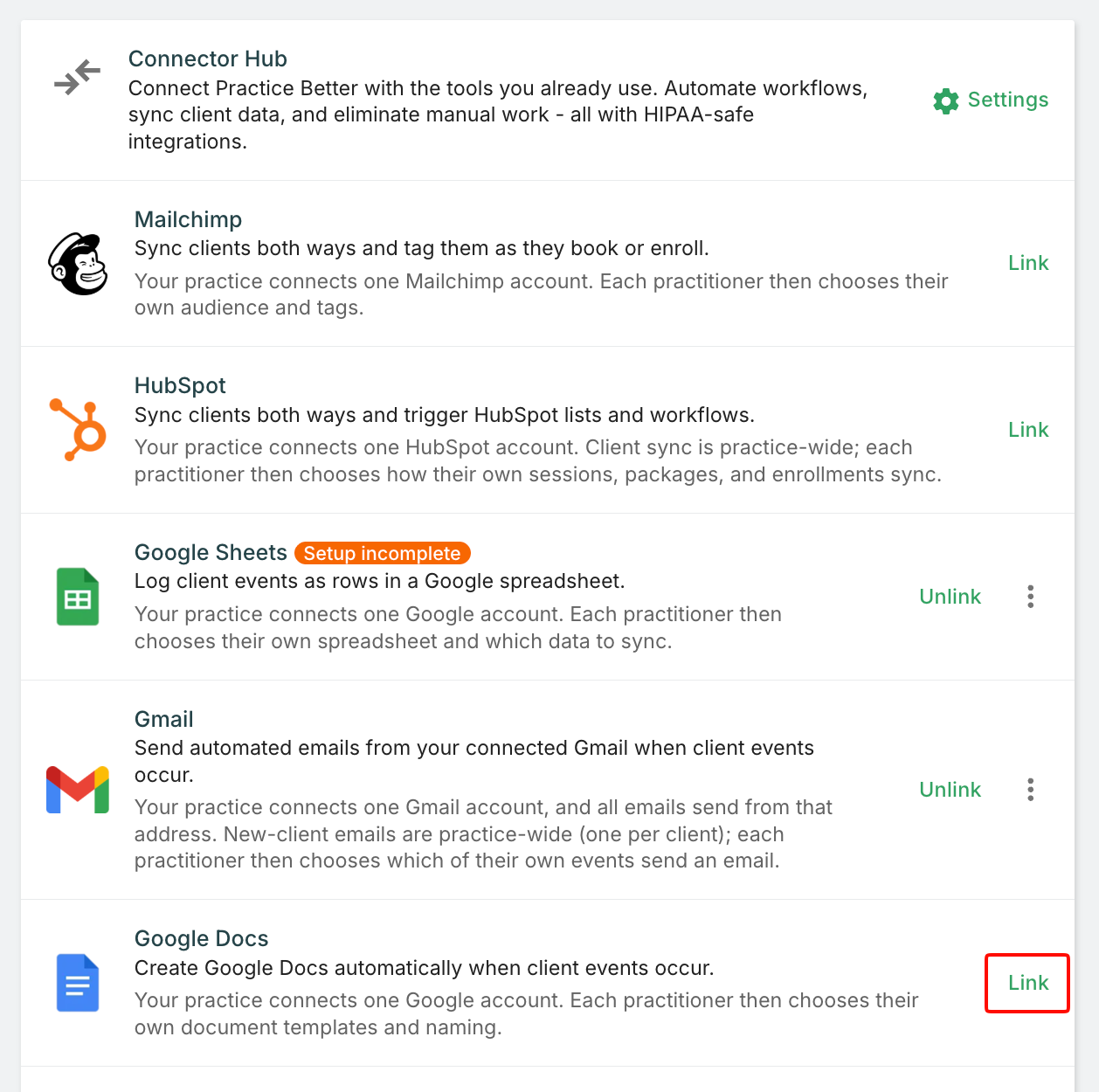
Click Link next to the app you want, select Connect, sign in to your account in the new tab, authorize the connection, and click Finish.
3. Choose your workflows
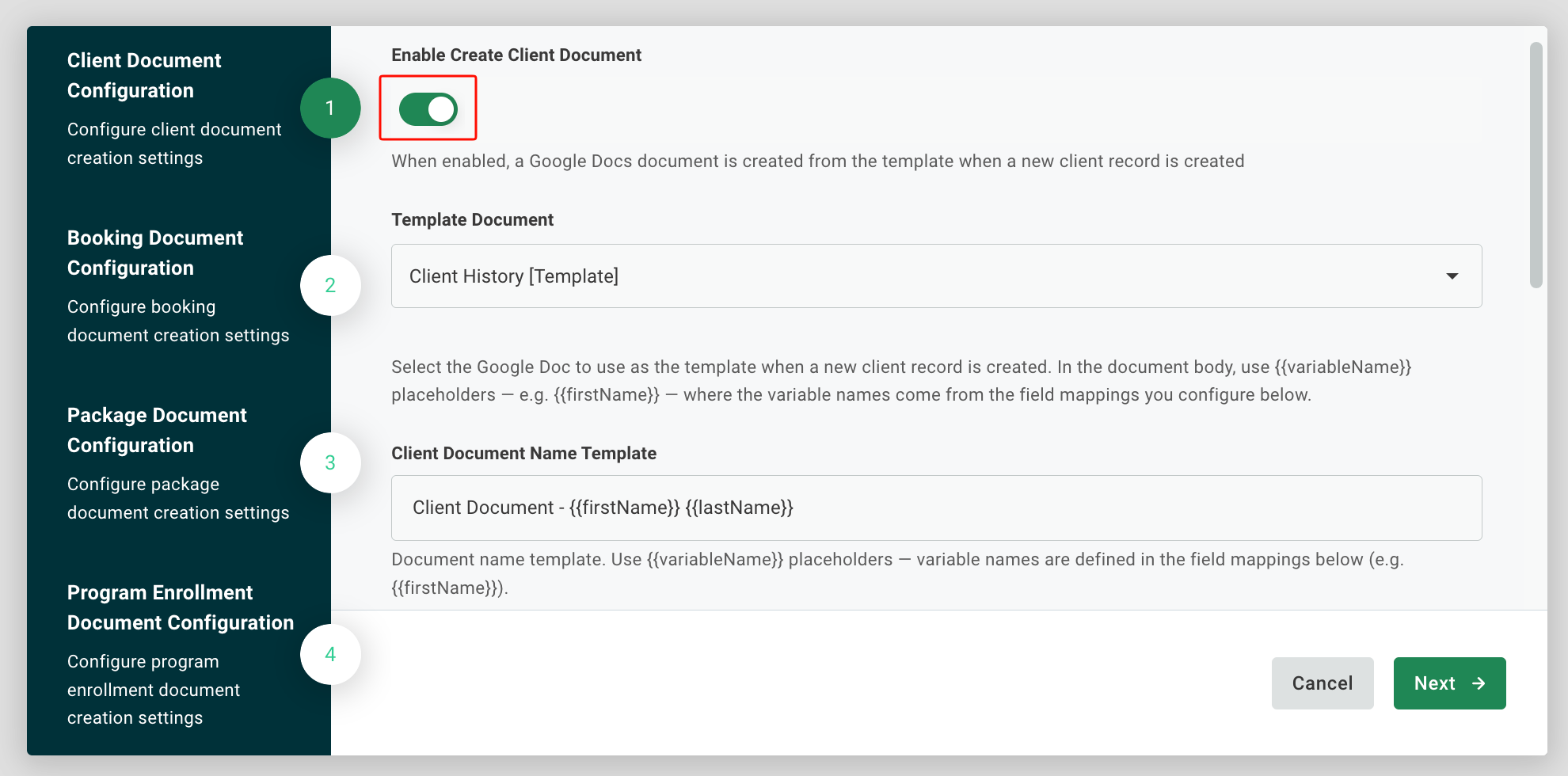
Toggle on the actions you want. If a workflow uses a template, like a Google Doc, select it and choose which Practice Better fields to include.
4. Running a team? Set permissions
The practice owner makes the first connection. Then, under My Team > Roles & Permissions > My Practice: Settings, enable Manage Connectors for the roles that need it.
For step-by-step instructions, see Setting Up and Managing Connector Hub.
Who can use Connector Hub?
Connector Hub is a paid add-on for Plus and Team plans. If you're on Starter or Professional, you'll see an option to upgrade your plan.
How much does it cost?
$49/month.
Will clients get duplicate emails?
Not if you plan for it. Connector Hub emails send independently from Practice Better's built-in notifications, so use them for things like a follow-up instruction email after a client books, rather than replacing the booking confirmation.
How do I set up Connector Hub?
On a Plus plan, go to Settings > 3rd Party Integrations, click Get Started next to Connector Hub, confirm the add-on, then Link the apps you want.
On a Team plan, the practice owner makes the initial connection and can then give other roles permission to manage connectors. Connector Hub isn't available to admin team members. For step-by-step instructions, see Setting Up and Managing Connector Hub.
Is Connector Hub HIPAA-compliant?
Connector Hub is built on HIPAA-compliant infrastructure, and data is transmitted securely. When a connector is active, Practice Better shares the relevant client information that workflow needs with the app you've connected.
What if something stops working?
You'll see an error banner at the top of Settings > 3rd Party Integrations and a bell notification explaining the issue. Check that your third-party account is still active and authorized. Unlinking and re-linking the app usually resolves it.
What if the app I need isn't on the list?
Connector Hub will keep growing based on what practitioners tell us they need. Let our team know which tools matter most to your practice at [email protected].
Your expertise is what your clients came for. Connector Hub takes the repetitive work off your plate so more of your day goes to the work only you can do.
→ Open Connector Hub and link your first app
New to Practice Better? Start your free trial and see how it all fits together.
Practice Better is the complete practice management platform for health and wellness professionals. Power your practice and start your free trial today.
{{free-trial-simple-text}}
.jpg)
A new client books with you. Before your first session, you've added them to QuickBooks, dropped their email into Mailchimp, logged them in your tracking spreadsheet, and sent a welcome note.
That's four tasks for one client. You didn't become a practitioner to be a part-time data entry clerk.
Connector Hub connects Practice Better to the tools you already use, so the right things happen automatically every time a client is added, books, buys a package, or joins a program. It's HIPAA-compliant, it's built right into your Practice Better account, and there's no code involved.
Here's what that means for your practice.
Every record you stop re-typing is time you can put toward your craft, your clients, or your evenings. Set a workflow up once, and it runs every time, in the background.
You decide which events trigger which actions. Nothing happens that you didn't choose.
Your clients trust you with sensitive information. General-purpose automation tools weren't built with healthcare in mind, which can leave you choosing between saving time and protecting your clients.
Connector Hub removes that choice. It's built on HIPAA-compliant infrastructure, and data is transmitted securely.
When a connector is active, Practice Better shares the relevant client information that workflow needs, typically client demographics plus details specific to the action, like session information for a booking. You stay in control: turn any workflow off, edit it, or unlink an app at any time.
You're mid-session when a new client signs up. With Connector Hub, they can get a welcome email from your own Gmail, land in the right Mailchimp tag, and be added to a HubSpot list or workflow without you lifting a finger.
Your client feels looked after from minute one. You don't have to remember a thing.
When your tools update from the same starting point, you stop wondering which spreadsheet has the right phone number or whether that new client made it into your accounting software. Fewer manual entries means fewer errors to clean up later.
Adding clients, or practitioners, usually means adding admin. Connector Hub is designed so your workflows keep up. On a Team plan, the practice owner connects each app once, and practitioners complete their own settings where an app needs them, like choosing their Mailchimp audience, spreadsheet, or Outlook calendar.
{{free-trial-simple-text}}
Connector Hub works with 11 apps at launch. Here's what a few common combinations can look like in your practice.
When a new client signs up
Create a contact in HubSpot, add or update them as a subscriber in Mailchimp, send a welcome email from Gmail, and add a row to Google Sheets. Four steps, zero typing.
When a client books a session
Send a meeting invite in Outlook, create a prep document from your own template in Google Docs, and add a customer record in QuickBooks or a contact in Xero so your accounting software is ready when you are.
When a client buys a package or enrolls in a program
Tag them in Mailchimp, add them to a HubSpot list or workflow, or add them to a Salesforce Campaign so your onboarding or nurture follows automatically.
When it's time to close the books
Export payment history and transaction statements to Excel for your bookkeeper, and let OneDrive back up client documents to the right client folder as they're uploaded.
Some of these also work in reverse. A new customer in QuickBooks or a new contact in Xero can show up in Practice Better as a client, and new Mailchimp subscribers or HubSpot list contacts can be added as clients too.
See every workflow in the Available Apps and Workflows in Connector Hub help article.
If you're a solo practitioner on Plus, you're likely the one doing all of this by hand. Connector Hub takes the repeat work off your plate so you can grow your client list without growing your to-do list.
If you run a team, consistency matters as much as time. Connector Hub gives your whole practice a shared way to keep your accounting, email, CRM, and documents in step, without asking every practitioner to do it manually.
If you're evaluating Practice Better, this is what "all-in-one" looks like when your business runs on more than one tool. Your platform and your stack, working together.
You'll need an active account with each app you want to connect. Connector Hub is a $49/month add-on for Plus and Team plans.
1. Add Connector Hub
Go to Settings > 3rd Party Integrations, click Get Started next to Connector Hub, and confirm the add-on purchase.
2. Link an app
Click Link next to the app you want, select Connect, sign in to your account in the new tab, authorize the connection, and click Finish.
3. Choose your workflows
Toggle on the actions you want. If a workflow uses a template, like a Google Doc, select it and choose which Practice Better fields to include.
4. Running a team? Set permissions
The practice owner makes the first connection. Then, under My Team > Roles & Permissions > My Practice: Settings, enable Manage Connectors for the roles that need it.
For step-by-step instructions, see Setting Up and Managing Connector Hub.
Who can use Connector Hub?
Connector Hub is a paid add-on for Plus and Team plans. If you're on Starter or Professional, you'll see an option to upgrade your plan.
How much does it cost?
$49/month.
Will clients get duplicate emails?
Not if you plan for it. Connector Hub emails send independently from Practice Better's built-in notifications, so use them for things like a follow-up instruction email after a client books, rather than replacing the booking confirmation.
How do I set up Connector Hub?
On a Plus plan, go to Settings > 3rd Party Integrations, click Get Started next to Connector Hub, confirm the add-on, then Link the apps you want.
On a Team plan, the practice owner makes the initial connection and can then give other roles permission to manage connectors. Connector Hub isn't available to admin team members. For step-by-step instructions, see Setting Up and Managing Connector Hub.
Is Connector Hub HIPAA-compliant?
Connector Hub is built on HIPAA-compliant infrastructure, and data is transmitted securely. When a connector is active, Practice Better shares the relevant client information that workflow needs with the app you've connected.
What if something stops working?
You'll see an error banner at the top of Settings > 3rd Party Integrations and a bell notification explaining the issue. Check that your third-party account is still active and authorized. Unlinking and re-linking the app usually resolves it.
What if the app I need isn't on the list?
Connector Hub will keep growing based on what practitioners tell us they need. Let our team know which tools matter most to your practice at [email protected].
Your expertise is what your clients came for. Connector Hub takes the repetitive work off your plate so more of your day goes to the work only you can do.
→ Open Connector Hub and link your first app
New to Practice Better? Start your free trial and see how it all fits together.
Practice Better is the complete practice management platform for health and wellness professionals. Power your practice and start your free trial today.
{{free-trial-simple-text}}