{{root-cause-revenue-method}}
World Digestive Health Day landed on May 29 this year. The World Gastroenterology Organization's 2026 theme — "Chronic Diarrhea: Don't Flush the Signs Away" — is a useful reminder of how much clinical detail a nutrition or functional medicine practice has to hold for a single client. Symptom journals, trigger foods, stool patterns, hydration, supplements, lab markers, session notes, and a meal plan that actually reflects the protocol: all of it has to stay connected, week over week, inside a single clinical record.
That is the practical question this guide answers: how to manage meal planning and client tracking in one platform, inside a single coherent workflow. The short version: the platform has to carry both the clinical and the administrative load — protocols, nutrition depth, scheduling, and billing in one place.
The longer version is below, including a step-by-step use case and checklist for evaluating whether a single platform can carry your caseload.
Pro tip: To manage meal planning and client tracking in one platform, look for software that combines protocols, a clinical-grade meal-planning library, food and lifestyle journaling, secure messaging, intake forms, labs, and session notes in one client record.
Most nutrition, functional medicine, and health-coaching practices are still running on a stack: a scheduler here, a meal-plan tool there, an EHR or charting app, a separate journal app the client may or may not open, and email or text for everything in between. Each handoff is a place where the protocol degrades. A practitioner writes a low-FODMAP plan in one tool, exports a PDF, emails it to the client, and then relies on the next session to find out whether the client ate from it, how they felt, or which foods triggered symptoms.
A single platform compresses that workflow into one client record. The intake form, the labs, the protocol, the meal plan, the food and mood journal, the secure messages, and the session notes all sit against the same timeline. The practitioner can see — in one view — that a client's bloating spiked the day they reintroduced onion, that hydration dropped below the journal target on Thursdays, and that the message thread already contains the question the client is about to ask in session.
This is the workflow Practice Better is built around, and it is the lens to apply when comparing platforms.
If a platform claims to combine meal planning and client tracking, four workflows should be native to the platform: built in, documented, and supported without third-party automation.
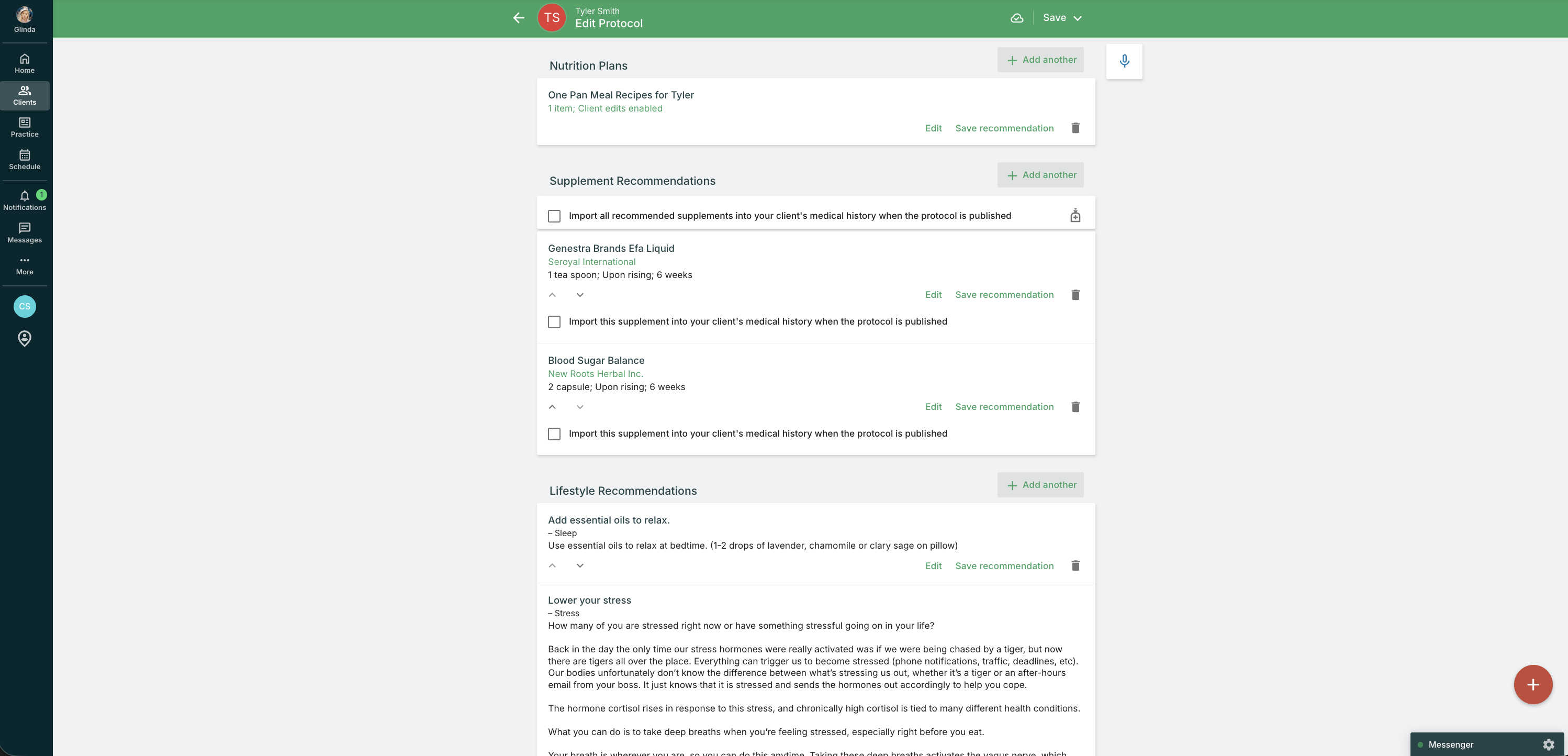
Protocols are the connective tissue. The platform should let you build a structured protocol — supplements, lifestyle inputs, dietary guidance, follow-up tasks — and attach a real meal plan to it. Practice Better's Protocols module handles the clinical layer, and the That Clean Life integration brings in 8,000+ recipes and pre-built meal plans on the nutrition side. Setup is documented step-by-step in the Practice Better Help Center, and once connected, plans push directly to the client portal alongside the protocol they belong to.
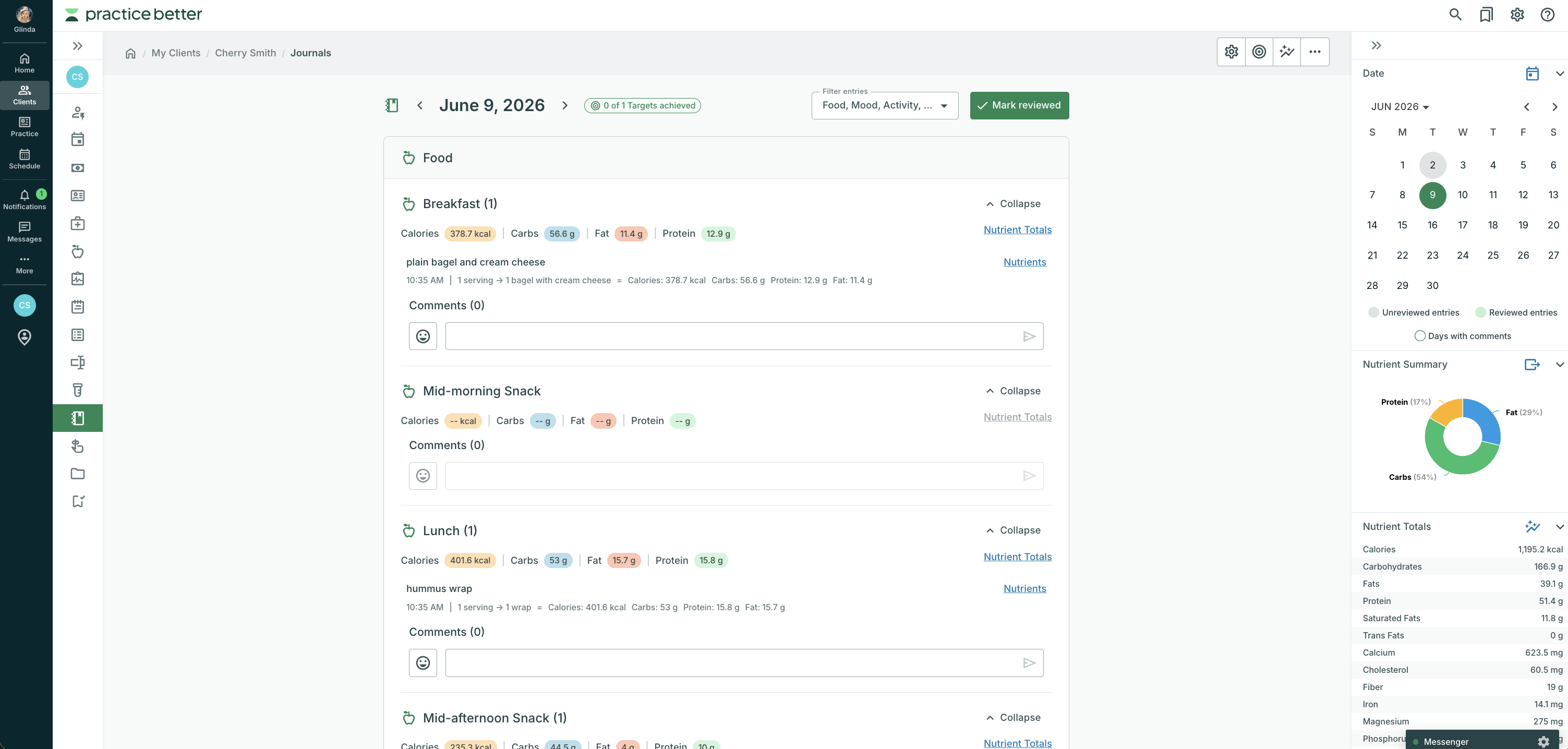
Visibility into adherence is what separates a clinical meal plan from a PDF attachment. The tracking half of the workflow lives in the journal. The Practice Better Food, Mood & Lifestyle Journal gives clients a food database of 600,000+ items and lets them log by photo, barcode, or free text, plus mood, symptoms, sleep, hydration, and activity. Journal Targets — hydration goals, nutrient ranges, sleep windows, activity minutes — let the practitioner set the behavioral guardrails of the protocol and watch adherence continuously, between sessions.
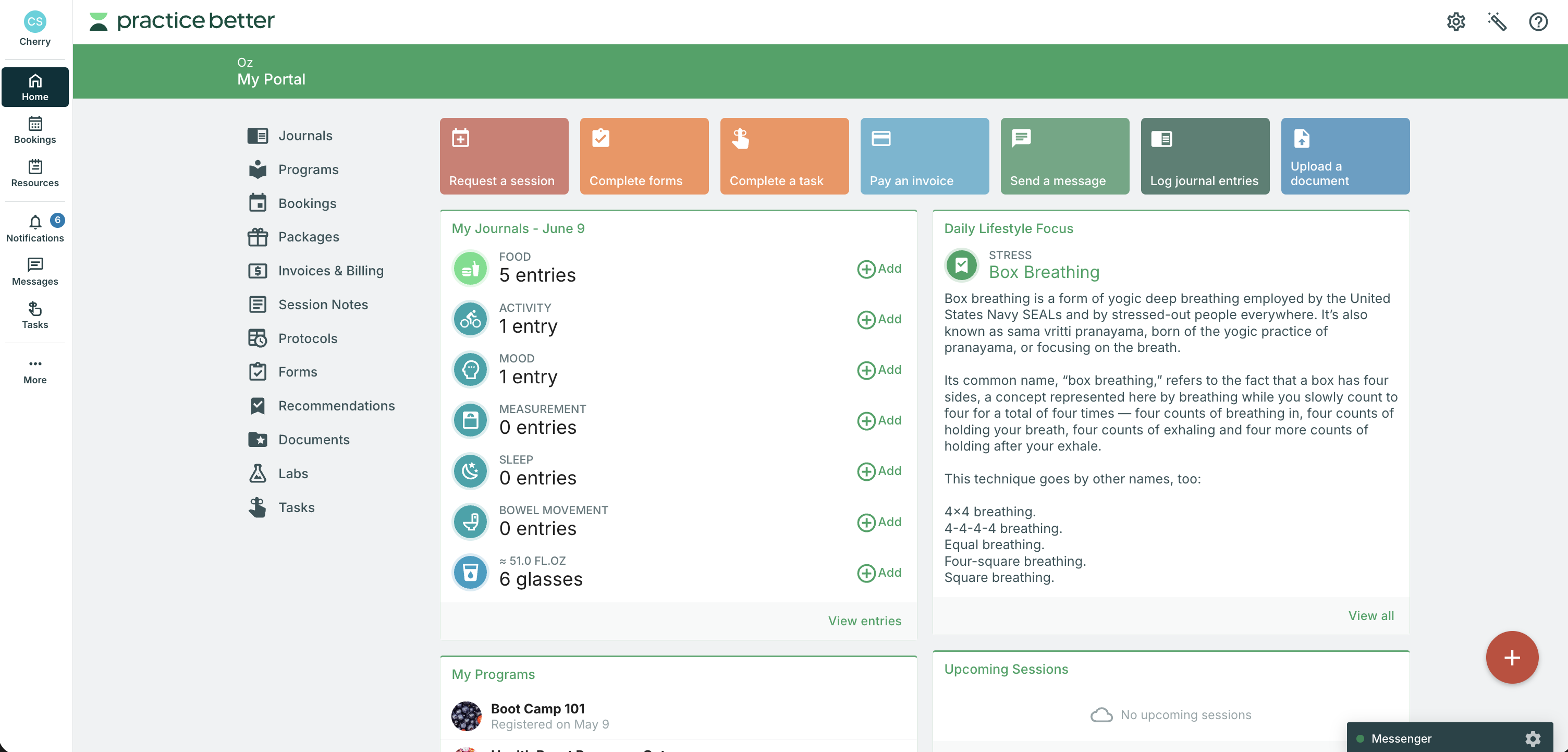
Between sessions, the platform has to carry the conversation. The Client Portal gives clients one place to see protocols, meal plans, journals, documents, and upcoming sessions, and HIPAA-compliant Secure Messaging replaces the email and SMS thread where protocol questions usually get lost. Compliance posture matters here. Practice Better's Trust Center documents the platform's compliance commitments, which is worth reading before you move client data anywhere.
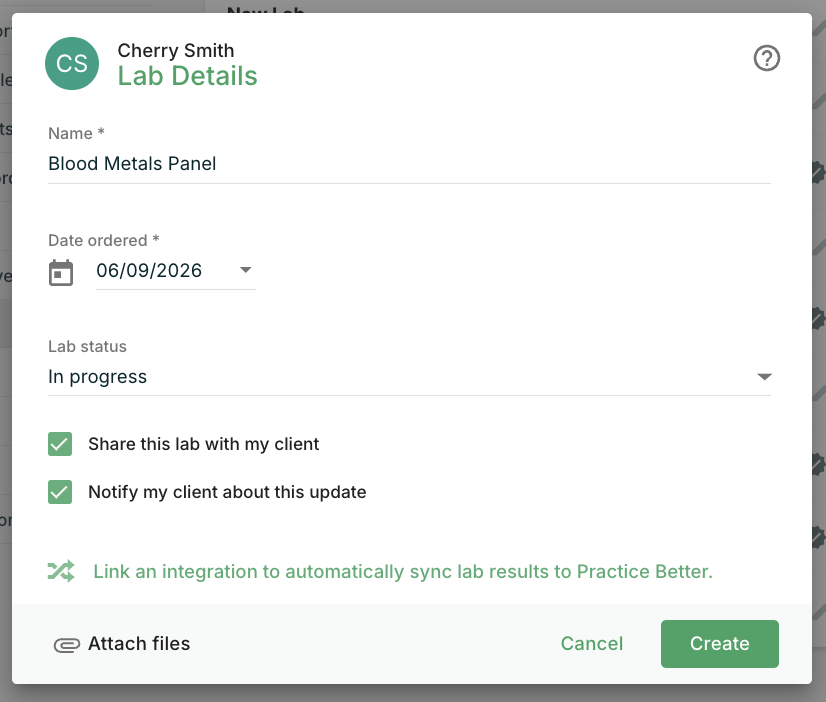
The fourth workflow is the chart. Intake forms feed the initial protocol, labs and uploaded documents give the protocol clinical context, and session notes close the loop. When all four — protocols, journals, messaging, and charting — share one client record, "meal planning" stops being a separate product and becomes a feature of the practice.
{{free-trial-simple-text}}
The WGO's 2026 theme for World Digestive Health Day — "Chronic Diarrhea: Don't Flush the Signs Away" — is a useful test case, because chronic GI work is exactly where a fragmented stack falls apart. Here is what a low-FODMAP elimination-and-reintroduction protocol looks like inside a single platform.
That is the practical answer to "one platform": a workflow that holds from one session to the next.
For practitioners who would rather not build a gut protocol from scratch, the 4R Gut Protocol Challenge is a done-for-you program available free in the Practice Better Community template library. Built in collaboration with Fullscript and That Clean Life, it includes 11 modules, Low FODMAP and gut-supportive meal plans, four targeted Fullscript supplements (probiotics, L-Glutamine, Vitamin D3, gut lining support), client check-in forms, and habit tracking — the full 4R framework (Remove, Replace, Reinoculate, Repair) deployed inside the same one-platform workflow described above. Practitioners can load it into their account in minutes and start running it with clients the same week.
A short checklist for practitioners auditing their stack:
Most practitioners can run this audit in an afternoon. If three or more items break in the current stack, a single-platform move pays for itself in time recovered.
For a direct look at how platforms compare on these criteria, the 2026 nutritionist software roundup and the Practice Better vs Healthie comparison cover the trade-offs in detail. To see how Practice Better handles all six, explore a demo or review the pricing options directly. And if a gut protocol is on your roadmap, the 4R Gut Protocol Challenge is a free, ready-to-deploy program in the Practice Better Community.
{{free-trial-simple-text}}
How do I manage meal planning and client tracking in one platform?
Managing meal planning and client tracking in one platform requires software that combines protocols, a clinical-grade recipe library, food and lifestyle journaling, secure messaging, intake forms, labs, and session notes in a single client record. The key is that all four workflows — protocols, journaling, messaging, and charting — share one timeline, so the practitioner can review adherence and adjust the plan between sessions without switching tools.
What should I look for in practice management software that includes meal planning?
Look for a native recipe library or a direct integration with a meal-planning tool, food and symptom journaling inside the same client portal, HIPAA-compliant messaging for between-session adjustments, and a charting layer that keeps intake, labs, and session notes on the same record as the meal plan. PDF upload alone does not qualify as meal planning — the platform needs to support adherence tracking alongside the plan.
Can I run a low-FODMAP or gut health protocol inside a practice management platform?
Yes, with the right platform. A gut health protocol requires intake screening, lab uploads, a structured elimination-and-reintroduction plan, symptom journaling with food triggers, and secure messaging for between-session adjustments — all of which should live in one client record. Practice Better supports this workflow natively through its Protocols module, That Clean Life integration, and Food, Mood & Lifestyle Journal.
Which practice management platforms include meal planning?
Practice Better includes native meal planning through a direct That Clean Life integration, giving practitioners access to 7,000+ recipes and pre-built clinical meal plans inside the platform. Most general-purpose practice management tools require a separate meal-planning subscription, which means managing two accounts and two client-facing apps.
Does Practice Better combine meal planning and client tracking in one platform?
Yes. Practice Better's That Clean Life integration connects 7,000+ recipes and clinical meal plans directly to the client portal, alongside food and lifestyle journaling, secure messaging, protocols, labs, and session notes — all in one client record. Pricing starts at $35/month.

{{root-cause-revenue-method}}
World Digestive Health Day landed on May 29 this year. The World Gastroenterology Organization's 2026 theme — "Chronic Diarrhea: Don't Flush the Signs Away" — is a useful reminder of how much clinical detail a nutrition or functional medicine practice has to hold for a single client. Symptom journals, trigger foods, stool patterns, hydration, supplements, lab markers, session notes, and a meal plan that actually reflects the protocol: all of it has to stay connected, week over week, inside a single clinical record.
That is the practical question this guide answers: how to manage meal planning and client tracking in one platform, inside a single coherent workflow. The short version: the platform has to carry both the clinical and the administrative load — protocols, nutrition depth, scheduling, and billing in one place.
The longer version is below, including a step-by-step use case and checklist for evaluating whether a single platform can carry your caseload.
Pro tip: To manage meal planning and client tracking in one platform, look for software that combines protocols, a clinical-grade meal-planning library, food and lifestyle journaling, secure messaging, intake forms, labs, and session notes in one client record.
Most nutrition, functional medicine, and health-coaching practices are still running on a stack: a scheduler here, a meal-plan tool there, an EHR or charting app, a separate journal app the client may or may not open, and email or text for everything in between. Each handoff is a place where the protocol degrades. A practitioner writes a low-FODMAP plan in one tool, exports a PDF, emails it to the client, and then relies on the next session to find out whether the client ate from it, how they felt, or which foods triggered symptoms.
A single platform compresses that workflow into one client record. The intake form, the labs, the protocol, the meal plan, the food and mood journal, the secure messages, and the session notes all sit against the same timeline. The practitioner can see — in one view — that a client's bloating spiked the day they reintroduced onion, that hydration dropped below the journal target on Thursdays, and that the message thread already contains the question the client is about to ask in session.
This is the workflow Practice Better is built around, and it is the lens to apply when comparing platforms.
If a platform claims to combine meal planning and client tracking, four workflows should be native to the platform: built in, documented, and supported without third-party automation.
Protocols are the connective tissue. The platform should let you build a structured protocol — supplements, lifestyle inputs, dietary guidance, follow-up tasks — and attach a real meal plan to it. Practice Better's Protocols module handles the clinical layer, and the That Clean Life integration brings in 8,000+ recipes and pre-built meal plans on the nutrition side. Setup is documented step-by-step in the Practice Better Help Center, and once connected, plans push directly to the client portal alongside the protocol they belong to.
Visibility into adherence is what separates a clinical meal plan from a PDF attachment. The tracking half of the workflow lives in the journal. The Practice Better Food, Mood & Lifestyle Journal gives clients a food database of 600,000+ items and lets them log by photo, barcode, or free text, plus mood, symptoms, sleep, hydration, and activity. Journal Targets — hydration goals, nutrient ranges, sleep windows, activity minutes — let the practitioner set the behavioral guardrails of the protocol and watch adherence continuously, between sessions.
Between sessions, the platform has to carry the conversation. The Client Portal gives clients one place to see protocols, meal plans, journals, documents, and upcoming sessions, and HIPAA-compliant Secure Messaging replaces the email and SMS thread where protocol questions usually get lost. Compliance posture matters here. Practice Better's Trust Center documents the platform's compliance commitments, which is worth reading before you move client data anywhere.
The fourth workflow is the chart. Intake forms feed the initial protocol, labs and uploaded documents give the protocol clinical context, and session notes close the loop. When all four — protocols, journals, messaging, and charting — share one client record, "meal planning" stops being a separate product and becomes a feature of the practice.
{{free-trial-simple-text}}
The WGO's 2026 theme for World Digestive Health Day — "Chronic Diarrhea: Don't Flush the Signs Away" — is a useful test case, because chronic GI work is exactly where a fragmented stack falls apart. Here is what a low-FODMAP elimination-and-reintroduction protocol looks like inside a single platform.
That is the practical answer to "one platform": a workflow that holds from one session to the next.
For practitioners who would rather not build a gut protocol from scratch, the 4R Gut Protocol Challenge is a done-for-you program available free in the Practice Better Community template library. Built in collaboration with Fullscript and That Clean Life, it includes 11 modules, Low FODMAP and gut-supportive meal plans, four targeted Fullscript supplements (probiotics, L-Glutamine, Vitamin D3, gut lining support), client check-in forms, and habit tracking — the full 4R framework (Remove, Replace, Reinoculate, Repair) deployed inside the same one-platform workflow described above. Practitioners can load it into their account in minutes and start running it with clients the same week.
A short checklist for practitioners auditing their stack:
Most practitioners can run this audit in an afternoon. If three or more items break in the current stack, a single-platform move pays for itself in time recovered.
For a direct look at how platforms compare on these criteria, the 2026 nutritionist software roundup and the Practice Better vs Healthie comparison cover the trade-offs in detail. To see how Practice Better handles all six, explore a demo or review the pricing options directly. And if a gut protocol is on your roadmap, the 4R Gut Protocol Challenge is a free, ready-to-deploy program in the Practice Better Community.
{{free-trial-simple-text}}
How do I manage meal planning and client tracking in one platform?
Managing meal planning and client tracking in one platform requires software that combines protocols, a clinical-grade recipe library, food and lifestyle journaling, secure messaging, intake forms, labs, and session notes in a single client record. The key is that all four workflows — protocols, journaling, messaging, and charting — share one timeline, so the practitioner can review adherence and adjust the plan between sessions without switching tools.
What should I look for in practice management software that includes meal planning?
Look for a native recipe library or a direct integration with a meal-planning tool, food and symptom journaling inside the same client portal, HIPAA-compliant messaging for between-session adjustments, and a charting layer that keeps intake, labs, and session notes on the same record as the meal plan. PDF upload alone does not qualify as meal planning — the platform needs to support adherence tracking alongside the plan.
Can I run a low-FODMAP or gut health protocol inside a practice management platform?
Yes, with the right platform. A gut health protocol requires intake screening, lab uploads, a structured elimination-and-reintroduction plan, symptom journaling with food triggers, and secure messaging for between-session adjustments — all of which should live in one client record. Practice Better supports this workflow natively through its Protocols module, That Clean Life integration, and Food, Mood & Lifestyle Journal.
Which practice management platforms include meal planning?
Practice Better includes native meal planning through a direct That Clean Life integration, giving practitioners access to 7,000+ recipes and pre-built clinical meal plans inside the platform. Most general-purpose practice management tools require a separate meal-planning subscription, which means managing two accounts and two client-facing apps.
Does Practice Better combine meal planning and client tracking in one platform?
Yes. Practice Better's That Clean Life integration connects 7,000+ recipes and clinical meal plans directly to the client portal, alongside food and lifestyle journaling, secure messaging, protocols, labs, and session notes — all in one client record. Pricing starts at $35/month.