Key takeaways:
The new year represents a fresh start for your practice and the perfect opportunity to take full advantage of Practice Better's powerful features. Whether you took a brief holiday break or an extended closure, reopening strategically means leveraging the right tools to hit the ground running.
Many practitioners underutilize Practice Better's automation and communication features, handling tasks manually that could be streamlined. As you reopen your practice, this is your chance to work smarter, not harder.
This guide focuses on the essential Practice Better features that will help you:
Let's explore how to leverage Practice Better's tools to ensure a smooth, strategic, and successful reopening.
Automations are the backbone of an efficient practice, yet they're often paused or disabled during closures. As you reopen, your automations need strategic attention to ensure they're working for you—not against you.
Why this matters: Automations handle repetitive communication and administrative tasks that would otherwise consume hours of your time. Re-enabling them correctly means clients get timely follow-ups, reminders, and resources without you lifting a finger.
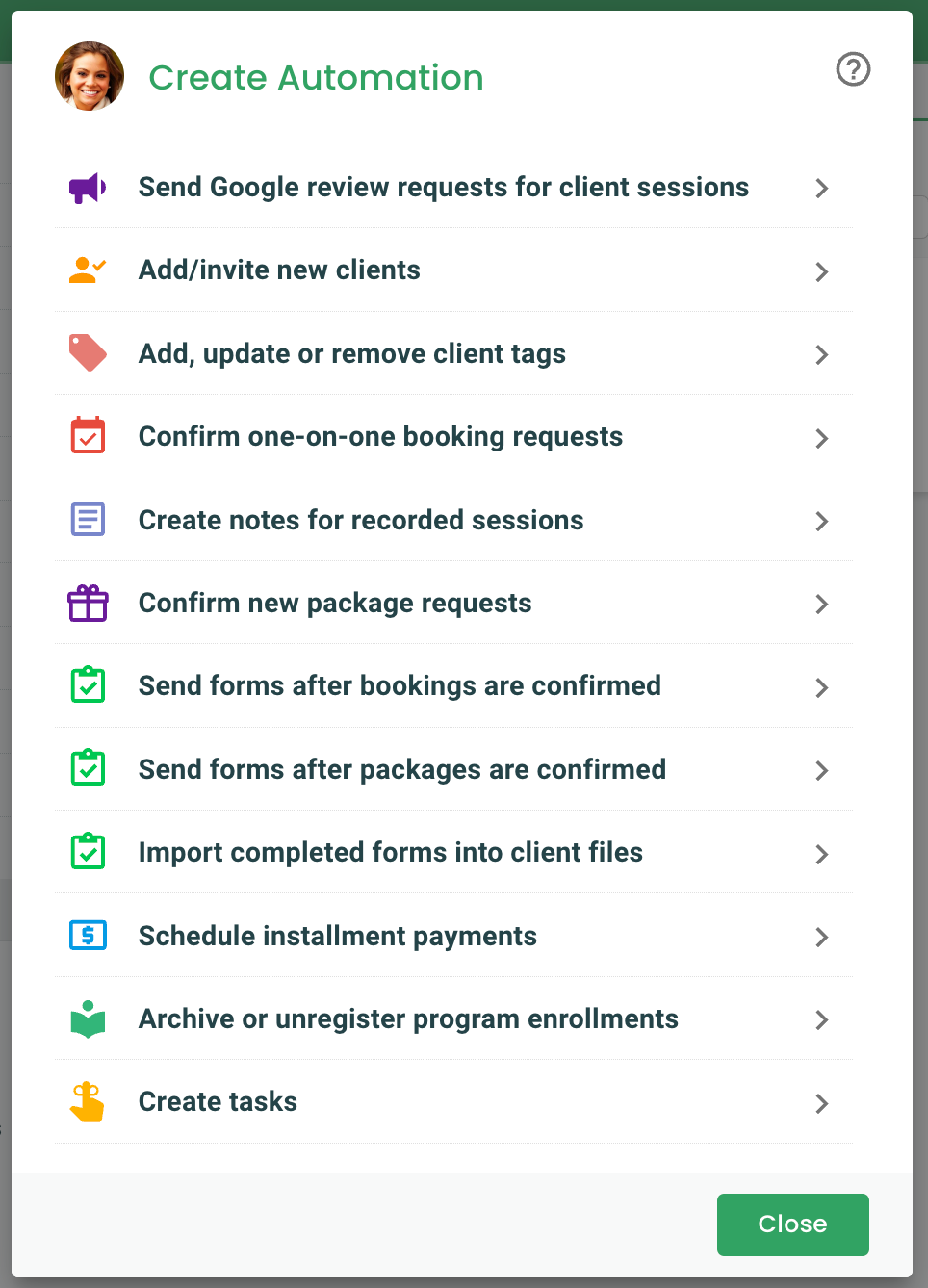
Session reminders and confirmations – These ensure clients show up to appointments and reduce no-shows. If you disabled these during your break, turn them back on before clients start booking January sessions.
Post-session follow-ups – Automated care plans, homework assignments, or check-in messages should resume immediately so clients get consistent support.
Payment and invoice reminders – If you paused these during the holidays, re-enable them now to maintain healthy cash flow.
Program and course automations – If you offer group programs or courses, ensure any enrollment sequences, content delivery, or milestone messages are active.
Welcome sequences – If you paused new client enrollment during your break, review your welcome automation to ensure it reflects your current availability and offerings. Update any holiday-specific language or timing references.
Nurture campaigns – Check that any email sequences or client engagement workflows have appropriate timing. If a sequence references "booking your December session," update it to reflect January availability.
Date-sensitive automations – Any automation tied to specific dates or seasonal offerings may need adjustment for the new year.
Pro tip: Create a "New Year Automation Audit" task for yourself. Every January, review all your automations to ensure they're still relevant, effective, and aligned with your current practice goals.
Broadcast Messages are one of Practice Better's most powerful and underused features. They allow you to send targeted communications to your entire client list (or specific segments) through the Client Portal chat, email, or both.
Why this matters: Individual emails or messages take time and don't reach clients where they already engage with you. Broadcast Messages put your reopening announcement directly in front of clients in the platform they're already using to book sessions and access their care plans.
Your return date – Be crystal clear about when you're officially back and accepting appointments.
Available time slots – Give clients a sense of your January availability. If certain days are filling up quickly, mention it to create a gentle sense of urgency.
Booking instructions – Include a direct link to your booking page or instructions for scheduling.
New offerings – The new year is an ideal time to launch new services, programs, or packages. Announce them in your reopening message.
Any policy updates – If you've changed pricing, cancellation policies, or service offerings, communicate these clearly upfront.
Example reopening broadcast message:
"Hi [Name],
Happy New Year! I'm excited to let you know that [Practice Name] is officially back and accepting appointments starting January 6th.
I have limited spots available in January, so I encourage you to book early to secure your preferred times: [Booking Link]
This year, I'm launching a new 12-week gut health program designed to help you finally address those persistent digestive issues. I'd love to tell you more about it during your next session.
Looking forward to supporting you in 2026!
[Your Name]"
.png)
Advanced tip: Segment your broadcasts by client type or engagement level. Send one message to active clients encouraging them to book their next session, and a different re-engagement message to clients you haven't seen in a while.
Note: Broadcast Messages are available on Plus and Team plans. If you're on a different plan, you can still send individual messages through the Client Portal or use your email marketing platform, though it won't be as streamlined.
Practice Better's reporting suite is essential for both closing out the previous year financially and starting the new year with clean, organized data. Yet many practitioners don't take full advantage of these reports until they're scrambling at tax time.
Why this matters: Tax season is stressful enough without digging through months of transactions trying to reconcile income. Exporting your year-end reports now, while you're already in "reopening mode", means you'll have everything ready when your accountant needs it.
Payment History Report – This shows all payments received during the year. It's your primary income tracking document and what you'll use to verify your total practice revenue.
Transaction Statement Report – This includes payments, refunds, and write-offs. It provides a complete financial picture beyond just incoming payments, showing the full lifecycle of your invoices.
Sales Tax Report – If you collect sales tax on services or products, this report shows exactly what taxes were collected on invoices throughout the year.
Accounts Receivable Invoices Report – This displays all outstanding balances clients still owe. Include this so your accountant understands revenue you've invoiced but not yet received.
.png)
Export your Practice Better Reports
Organization best practices:
If you use Practice Better Payments (powered by Stripe) to process credit card payments, you may receive a 1099-K form for Payment Card and Third Party Network Transactions.
This form reports gross payment volume and is issued if you processed over a certain threshold in payments during the year. The threshold has changed over recent years, so check current IRS guidelines or consult your tax professional.
Important: You will receive your 1099-K form directly from your payment processor if you meet the reportable income thresholds. Some states have lower thresholds, so check current IRS guidelines and your state requirements, or consult your tax professional.
The 1099-K shows gross payments, which include amounts that were later refunded or written off. Make sure your accountant reconciles this with your actual net income from your Practice Better reports.
Beyond tax prep, your year-end reports provide valuable insights for planning your new year strategy:
The new year brings an influx of people searching for health and wellness practitioners. Your online reputation plays a massive role in whether potential clients choose you over competitors.
Practice Better's Google review request automation makes it effortless to collect positive feedback from satisfied clients without manually asking after every session.
Why this matters: Most satisfied clients won't leave a review unless you ask. Manual requests are time-consuming and easy to forget. Automating this process ensures consistent reputation building without adding to your workload.
Reopening is the perfect time because:
Set up your Google review request automation
Pro tip: Set the automation to send 3-5 days after a session rather than immediately. This gives clients time to experience results from your recommendations, making them more likely to leave meaningful, positive reviews.
Not all practitioners can solicit reviews. Mental health providers, certain medical professionals, and some other regulated disciplines may face restrictions on requesting client testimonials.
Always check your professional board's guidelines before enabling review requests. If you're unsure, consult with your professional association or regulatory body.
If review solicitation isn't allowed in your field, you can still:
On the Professional, Plus, and Team plans, you can customize the email template:
Keep it brief, genuine, and focused on how their feedback helps others find quality care.
Automate Google review requests
Your calendar is the foundation of your practice operations. As you reopen, ensuring your availability is correctly configured prevents double-bookings, client confusion, and the January scramble of "I didn't know you were available then!"
Why this matters: Clients can only book what you make available. If your January calendar isn't open yet, you're losing booking opportunities. If your recurring availability is wrong, you'll spend time manually fixing errors instead of seeing clients.
Your recurring availability controls what times clients can book each week. Review this before reopening to ensure it reflects any schedule changes for the new year.
How to update availability in Practice Better:
Pro tip: Add buffer time between sessions to prevent back-to-back burnout. Even 10-15 minutes between appointments gives you time to take notes, use the restroom, or clear your head before the next client.
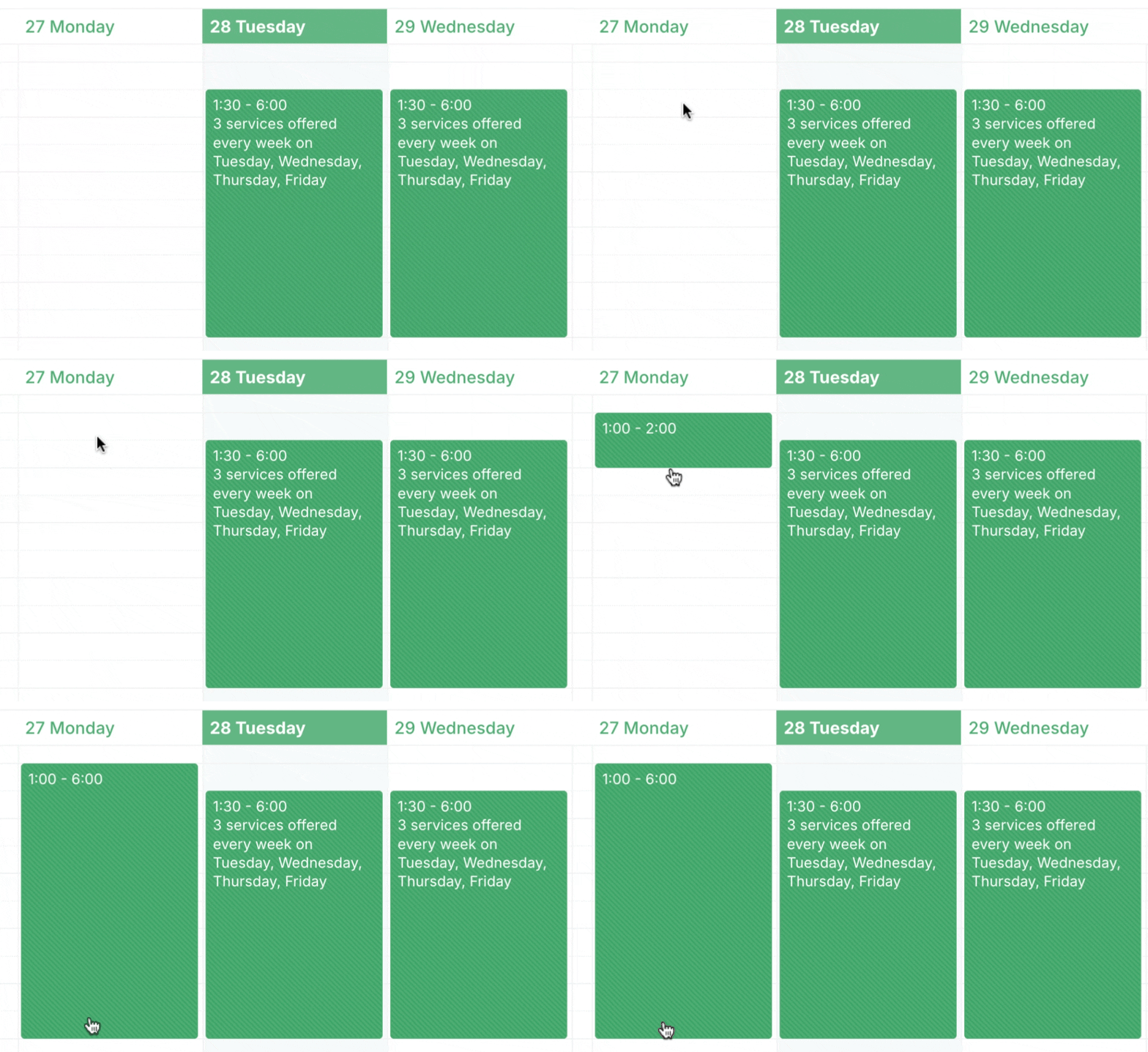
Don't assume your standard weekly availability automatically populates future months. Manually verify that your January and February calendars are open and correctly configured.
Check for:
Booking windows control how far in advance (or how last-minute) clients can schedule with you.
Settings to review:
Alternative: You can also set booking restrictions per service:
Adjust your booking restrictions
If you enabled an out-of-office notification during your closure, disable it before clients start booking.
How to disable out-of-office notification:
Manage your out-of-office notifications
Also remember to disable your Chat Autoresponder if you enabled one:
Pro tip: Keep your out-of-office notification configuration saved even after you disable it. You'll want to re-use the same settings for future closures, and having it ready to toggle on makes future breaks easier to manage.
Disable your chat autoresponder
The new year is a fresh financial start—but only if you collect on outstanding balances from the previous year. Practice Better's automated invoice reminders help you maintain healthy cash flow without awkward manual follow-ups.
Why this matters: Many practitioners hesitate to send payment reminders, worried about seeming pushy or damaging client relationships. Automation removes the personal awkwardness while ensuring clients receive professional, consistent reminders about outstanding balances.
If you haven't already enabled this feature, now is the time:
Set up automated invoice reminders
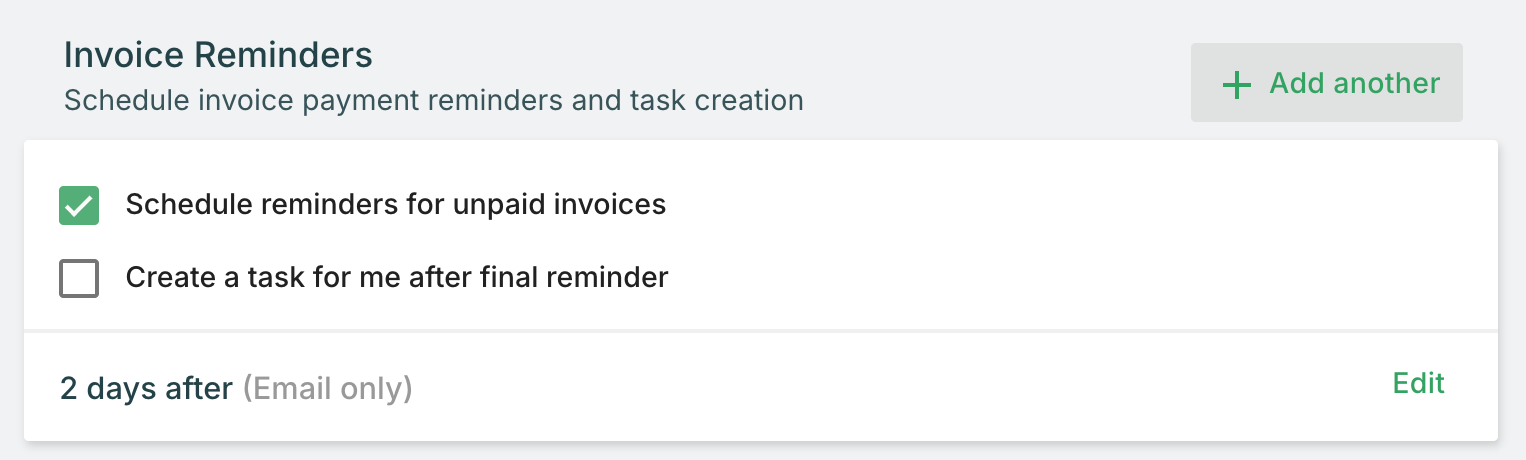
On the Professional, Plus, and Team plans, you can customize the invoice reminder email template:
Keep the message professional, brief, and matter-of-fact. Avoid apologetic language ("Sorry to bother you...") or overly aggressive demands. Simply state the facts: the invoice amount, due date, and how to pay.
Customize invoice payment reminder email notifications
Before you get busy with new client work, pull your Accounts Receivable Invoices report to see what balances carried over from last year:
Now that you understand the key Practice Better tools, here's your step-by-step action plan for the week before you reopen:
The real power of Practice Better comes from using multiple features together strategically. Here are some advanced workflows to consider:
The workflow:
Why it works: You're using data (Reports) to identify opportunities, segmentation (Tags) to target the right people, and automation to deliver timely, personalized outreach without manual effort.
The workflow:
Why it works: You're leveraging automation for consistent delivery, broadcast messaging for promotion, and review requests to create testimonials that attract future participants.
Bonus: Get our new 7 Day Mind Body Reset DFY Program and many more in the Community.
.png)
The workflow:
Why it works: Automation handles routine reminders, reports give you data to make informed policy decisions, and regular financial reviews keep you on top of cash flow.
Don't re-enable all automations blindly. Review each one individually to ensure the content, timing, and triggers are still relevant. Test critical automations before clients start booking.
If you only open your January calendar, clients looking to book in February will think you're not available. Open at least 6-8 weeks ahead to maximize booking opportunities.
Personalization matters. Use client names, reference your relationship, and segment messages by client type or engagement level when possible. Generic mass emails get ignored.
If your out-of-office notification is still active, clients will see a banner saying you're closed even though you're accepting bookings. Double-check all closure-related settings are disabled.
The longer you wait to export and organize your financial reports, the harder it becomes to remember details or reconcile discrepancies. Do it now while it's still fresh.
Don't pack your first day (or week) back with back-to-back sessions. Build in buffer time, administrative catch-up blocks, and breathing room. You'll be more effective with clients if you're not already exhausted.
Reopening your practice isn't just about turning off your out-of-office message and hoping clients book. Strategic use of Practice Better's tools transforms your reopening from reactive to proactive.
By leveraging these features, you'll:
The new year is your opportunity to work smarter, not harder. Practice Better handles the repetitive work—automations, reminders, reports—so you can focus on client care. Set them up once, and they work for you all year.
Ready to make the most of Practice Better? Start your free trial to explore all the features covered in this guide.
Already a Practice Better user? Dive deeper into specific features:
{{free-trial-simple-text}}

Key takeaways:
The new year represents a fresh start for your practice and the perfect opportunity to take full advantage of Practice Better's powerful features. Whether you took a brief holiday break or an extended closure, reopening strategically means leveraging the right tools to hit the ground running.
Many practitioners underutilize Practice Better's automation and communication features, handling tasks manually that could be streamlined. As you reopen your practice, this is your chance to work smarter, not harder.
This guide focuses on the essential Practice Better features that will help you:
Let's explore how to leverage Practice Better's tools to ensure a smooth, strategic, and successful reopening.
Automations are the backbone of an efficient practice, yet they're often paused or disabled during closures. As you reopen, your automations need strategic attention to ensure they're working for you—not against you.
Why this matters: Automations handle repetitive communication and administrative tasks that would otherwise consume hours of your time. Re-enabling them correctly means clients get timely follow-ups, reminders, and resources without you lifting a finger.
Session reminders and confirmations – These ensure clients show up to appointments and reduce no-shows. If you disabled these during your break, turn them back on before clients start booking January sessions.
Post-session follow-ups – Automated care plans, homework assignments, or check-in messages should resume immediately so clients get consistent support.
Payment and invoice reminders – If you paused these during the holidays, re-enable them now to maintain healthy cash flow.
Program and course automations – If you offer group programs or courses, ensure any enrollment sequences, content delivery, or milestone messages are active.
Welcome sequences – If you paused new client enrollment during your break, review your welcome automation to ensure it reflects your current availability and offerings. Update any holiday-specific language or timing references.
Nurture campaigns – Check that any email sequences or client engagement workflows have appropriate timing. If a sequence references "booking your December session," update it to reflect January availability.
Date-sensitive automations – Any automation tied to specific dates or seasonal offerings may need adjustment for the new year.
Pro tip: Create a "New Year Automation Audit" task for yourself. Every January, review all your automations to ensure they're still relevant, effective, and aligned with your current practice goals.
Broadcast Messages are one of Practice Better's most powerful and underused features. They allow you to send targeted communications to your entire client list (or specific segments) through the Client Portal chat, email, or both.
Why this matters: Individual emails or messages take time and don't reach clients where they already engage with you. Broadcast Messages put your reopening announcement directly in front of clients in the platform they're already using to book sessions and access their care plans.
Your return date – Be crystal clear about when you're officially back and accepting appointments.
Available time slots – Give clients a sense of your January availability. If certain days are filling up quickly, mention it to create a gentle sense of urgency.
Booking instructions – Include a direct link to your booking page or instructions for scheduling.
New offerings – The new year is an ideal time to launch new services, programs, or packages. Announce them in your reopening message.
Any policy updates – If you've changed pricing, cancellation policies, or service offerings, communicate these clearly upfront.
Example reopening broadcast message:
"Hi [Name],
Happy New Year! I'm excited to let you know that [Practice Name] is officially back and accepting appointments starting January 6th.
I have limited spots available in January, so I encourage you to book early to secure your preferred times: [Booking Link]
This year, I'm launching a new 12-week gut health program designed to help you finally address those persistent digestive issues. I'd love to tell you more about it during your next session.
Looking forward to supporting you in 2026!
[Your Name]"
Advanced tip: Segment your broadcasts by client type or engagement level. Send one message to active clients encouraging them to book their next session, and a different re-engagement message to clients you haven't seen in a while.
Note: Broadcast Messages are available on Plus and Team plans. If you're on a different plan, you can still send individual messages through the Client Portal or use your email marketing platform, though it won't be as streamlined.
Practice Better's reporting suite is essential for both closing out the previous year financially and starting the new year with clean, organized data. Yet many practitioners don't take full advantage of these reports until they're scrambling at tax time.
Why this matters: Tax season is stressful enough without digging through months of transactions trying to reconcile income. Exporting your year-end reports now, while you're already in "reopening mode", means you'll have everything ready when your accountant needs it.
Payment History Report – This shows all payments received during the year. It's your primary income tracking document and what you'll use to verify your total practice revenue.
Transaction Statement Report – This includes payments, refunds, and write-offs. It provides a complete financial picture beyond just incoming payments, showing the full lifecycle of your invoices.
Sales Tax Report – If you collect sales tax on services or products, this report shows exactly what taxes were collected on invoices throughout the year.
Accounts Receivable Invoices Report – This displays all outstanding balances clients still owe. Include this so your accountant understands revenue you've invoiced but not yet received.
Export your Practice Better Reports
Organization best practices:
If you use Practice Better Payments (powered by Stripe) to process credit card payments, you may receive a 1099-K form for Payment Card and Third Party Network Transactions.
This form reports gross payment volume and is issued if you processed over a certain threshold in payments during the year. The threshold has changed over recent years, so check current IRS guidelines or consult your tax professional.
Important: You will receive your 1099-K form directly from your payment processor if you meet the reportable income thresholds. Some states have lower thresholds, so check current IRS guidelines and your state requirements, or consult your tax professional.
The 1099-K shows gross payments, which include amounts that were later refunded or written off. Make sure your accountant reconciles this with your actual net income from your Practice Better reports.
Beyond tax prep, your year-end reports provide valuable insights for planning your new year strategy:
The new year brings an influx of people searching for health and wellness practitioners. Your online reputation plays a massive role in whether potential clients choose you over competitors.
Practice Better's Google review request automation makes it effortless to collect positive feedback from satisfied clients without manually asking after every session.
Why this matters: Most satisfied clients won't leave a review unless you ask. Manual requests are time-consuming and easy to forget. Automating this process ensures consistent reputation building without adding to your workload.
Reopening is the perfect time because:
Set up your Google review request automation
Pro tip: Set the automation to send 3-5 days after a session rather than immediately. This gives clients time to experience results from your recommendations, making them more likely to leave meaningful, positive reviews.
Not all practitioners can solicit reviews. Mental health providers, certain medical professionals, and some other regulated disciplines may face restrictions on requesting client testimonials.
Always check your professional board's guidelines before enabling review requests. If you're unsure, consult with your professional association or regulatory body.
If review solicitation isn't allowed in your field, you can still:
On the Professional, Plus, and Team plans, you can customize the email template:
Keep it brief, genuine, and focused on how their feedback helps others find quality care.
Automate Google review requests
Your calendar is the foundation of your practice operations. As you reopen, ensuring your availability is correctly configured prevents double-bookings, client confusion, and the January scramble of "I didn't know you were available then!"
Why this matters: Clients can only book what you make available. If your January calendar isn't open yet, you're losing booking opportunities. If your recurring availability is wrong, you'll spend time manually fixing errors instead of seeing clients.
Your recurring availability controls what times clients can book each week. Review this before reopening to ensure it reflects any schedule changes for the new year.
How to update availability in Practice Better:
Pro tip: Add buffer time between sessions to prevent back-to-back burnout. Even 10-15 minutes between appointments gives you time to take notes, use the restroom, or clear your head before the next client.
Don't assume your standard weekly availability automatically populates future months. Manually verify that your January and February calendars are open and correctly configured.
Check for:
Booking windows control how far in advance (or how last-minute) clients can schedule with you.
Settings to review:
Alternative: You can also set booking restrictions per service:
Adjust your booking restrictions
If you enabled an out-of-office notification during your closure, disable it before clients start booking.
How to disable out-of-office notification:
Manage your out-of-office notifications
Also remember to disable your Chat Autoresponder if you enabled one:
Pro tip: Keep your out-of-office notification configuration saved even after you disable it. You'll want to re-use the same settings for future closures, and having it ready to toggle on makes future breaks easier to manage.
Disable your chat autoresponder
The new year is a fresh financial start—but only if you collect on outstanding balances from the previous year. Practice Better's automated invoice reminders help you maintain healthy cash flow without awkward manual follow-ups.
Why this matters: Many practitioners hesitate to send payment reminders, worried about seeming pushy or damaging client relationships. Automation removes the personal awkwardness while ensuring clients receive professional, consistent reminders about outstanding balances.
If you haven't already enabled this feature, now is the time:
Set up automated invoice reminders
On the Professional, Plus, and Team plans, you can customize the invoice reminder email template:
Keep the message professional, brief, and matter-of-fact. Avoid apologetic language ("Sorry to bother you...") or overly aggressive demands. Simply state the facts: the invoice amount, due date, and how to pay.
Customize invoice payment reminder email notifications
Before you get busy with new client work, pull your Accounts Receivable Invoices report to see what balances carried over from last year:
Now that you understand the key Practice Better tools, here's your step-by-step action plan for the week before you reopen:
The real power of Practice Better comes from using multiple features together strategically. Here are some advanced workflows to consider:
The workflow:
Why it works: You're using data (Reports) to identify opportunities, segmentation (Tags) to target the right people, and automation to deliver timely, personalized outreach without manual effort.
The workflow:
Why it works: You're leveraging automation for consistent delivery, broadcast messaging for promotion, and review requests to create testimonials that attract future participants.
Bonus: Get our new 7 Day Mind Body Reset DFY Program and many more in the Community.
The workflow:
Why it works: Automation handles routine reminders, reports give you data to make informed policy decisions, and regular financial reviews keep you on top of cash flow.
Don't re-enable all automations blindly. Review each one individually to ensure the content, timing, and triggers are still relevant. Test critical automations before clients start booking.
If you only open your January calendar, clients looking to book in February will think you're not available. Open at least 6-8 weeks ahead to maximize booking opportunities.
Personalization matters. Use client names, reference your relationship, and segment messages by client type or engagement level when possible. Generic mass emails get ignored.
If your out-of-office notification is still active, clients will see a banner saying you're closed even though you're accepting bookings. Double-check all closure-related settings are disabled.
The longer you wait to export and organize your financial reports, the harder it becomes to remember details or reconcile discrepancies. Do it now while it's still fresh.
Don't pack your first day (or week) back with back-to-back sessions. Build in buffer time, administrative catch-up blocks, and breathing room. You'll be more effective with clients if you're not already exhausted.
Reopening your practice isn't just about turning off your out-of-office message and hoping clients book. Strategic use of Practice Better's tools transforms your reopening from reactive to proactive.
By leveraging these features, you'll:
The new year is your opportunity to work smarter, not harder. Practice Better handles the repetitive work—automations, reminders, reports—so you can focus on client care. Set them up once, and they work for you all year.
Ready to make the most of Practice Better? Start your free trial to explore all the features covered in this guide.
Already a Practice Better user? Dive deeper into specific features:
{{free-trial-simple-text}}



%202.png)