If you're running an integrative practice and trying to keep every client engaged, supported, and accountable, you've probably hit this wall:
You know clients need between-session check-ins. You know regular touchpoints improve adherence and outcomes. You know consistent communication builds trust and keeps people on track.
But you're also drowning.
Between seeing clients, documenting sessions, answering messages, managing your schedule, and trying to have some semblance of a personal life, there simply aren't enough hours to manually reach out to every client multiple times between appointments.
So what happens? You either burn out trying to do it all manually, or you let engagement slip—and watch clients drift away because they don't feel supported.
Here's the reality: you cannot scale personalized engagement through manual effort alone.
But here's the good news: you don't have to.
Strategic automation lets you stay connected with 30, 50, or 100+ clients without spending hours on repetitive communication. The key is knowing what to automate, how to automate it, and—critically—where to preserve the human touch that makes your care special.
This guide shows you exactly how to build automated client engagement systems that feel personal, improve outcomes, and give you your time back.
Not everything should be automated. Some moments require your clinical judgment, empathy, and personalized attention. But many routine touchpoints can and should be handled by technology.
Here's the framework:
✅ Appointment reminders - Everyone needs to be reminded of upcoming appointments
✅ Welcome sequences - Every new client needs the same onboarding information
✅ Form reminders - Intake paperwork, symptom trackers, progress assessments
✅ Educational content - Articles, recipes, resources you share repeatedly
✅ Milestone celebrations - Program completion, check-in anniversaries
✅ Habit prompts - Daily supplement reminders, weekly check-in nudges
✅ Post-session summaries - Care plan recap, next steps, resources
💚 Responses to client questions - These need your clinical judgment
💚 Complex troubleshooting - When recommendations aren't working
💚 Emotional support - During challenging moments or breakthroughs
💚 Care plan adjustments - When you need to change the approach
💚 Crisis situations - Urgent concerns or safety issues
💚 Re-engagement - When clients have ghosted or are struggling
Aim for 80% of routine touchpoints automated and 20% deeply personalized.
This gives you consistency at scale while preserving bandwidth for the moments that truly require your unique expertise and human connection.
Appointment no-shows and last-minute cancellations are revenue killers. Research shows automated reminders can reduce no-shows by 20-30%.
Reminder 1: Confirmation (immediately after booking)
Why it works: Immediate confirmation reduces anxiety and gives clients the information they need right away.
Reminder 2: 48-hour notice
Why it works: Two days gives clients enough time to reschedule if needed without losing the appointment slot.
Reminder 3: 24-hour final reminder
Why it works: A final reminder catches anyone who might have forgotten despite previous reminders.
SMS text reminders: Higher open rates than email (98% vs. 20%)
Calendar invites: Automatic addition to client's personal calendar
Click-to-reschedule: One-click rescheduling reduces friction
Time zone detection: Especially important for telehealth practices
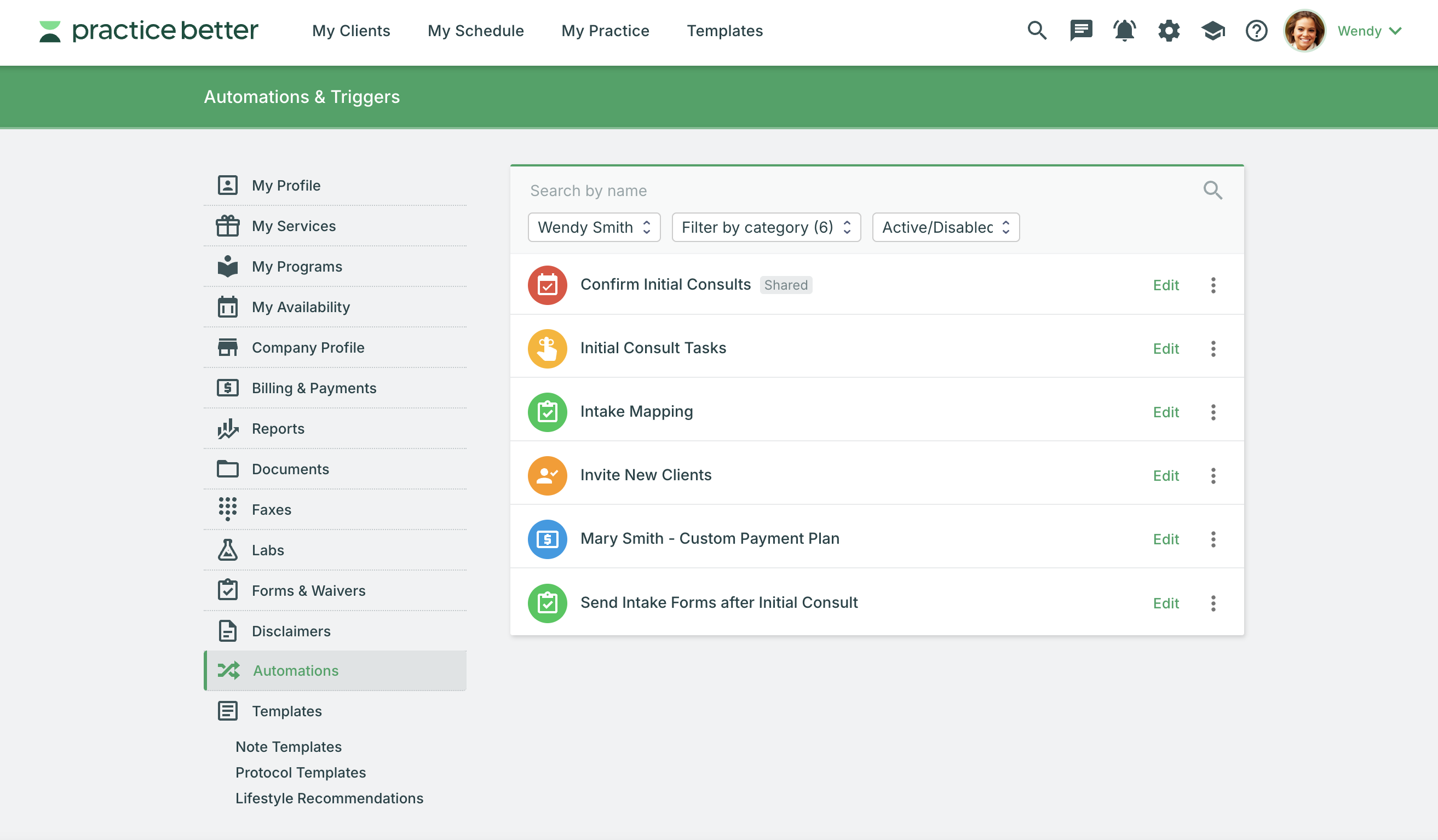
In Practice Better, you can set up all three reminders automatically. Once configured, every appointment gets reminders without any manual work—and you can customize the timing, content, and channels (email, SMS, or both).
Between-session check-ins keep clients accountable and engaged. But manually messaging 40+ clients every week isn't sustainable.
Post-appointment check-in (3-5 days after session)
Why it works: Checks in during the critical early implementation period when clients need support most.
Midpoint check-in (halfway between appointments)
Why it works: Prevents the "I'll deal with it before my next appointment" procrastination.
Pre-appointment preparation (2-3 days before next session)
Why it works: Ensures clients come prepared, making sessions more productive.
For clients working on specific habits (supplement compliance, water intake, meal timing, exercise, sleep), automated daily or weekly prompts can dramatically improve adherence.
Daily habit prompt (morning)
Hi [Client Name]! Quick check-in: Did you take your morning supplements? Log it here: [Link]
Daily habit prompt (evening)
Before bed: How many servings of vegetables did you have today? Track here: [Link]
Weekly habit review (Sunday evening)
Hi [Client Name], take 2 minutes to review your week: How many days did you complete your [habit]? Be honest—no judgment, just data! Update here: [Link]
In Practice Better, habit trackers can send automatic reminders at specific times, and clients can quickly log their progress from their phone. You can review completion rates at a glance before sessions.
Even automated messages should feel personal. Use these strategies:
1. Dynamic fields (name, goals, specific recommendations)
Not: "How are you doing?"
Better: "Hi Sarah, how's the new sleep routine working for you?"
2. Reference their specific goals
Not: "Keep up the good work!"
Better: "You mentioned wanting to reduce bloating—have you noticed any changes this week?"
3. Adjust tone to match your voice
If you're naturally warm and encouraging, your automated messages should be too. If you're more direct and straightforward, reflect that.
4. Segment by client type
Send different messages to:
5. Test and refine
Pay attention to response rates. If no one responds to a particular automated message, might be either poorly timed, poorly worded, or unnecessary.
Clients benefit from ongoing education, but you can't manually send resources to everyone who needs them. Create templates with reusable educational materials and automate the communication to clients.
1. Welcome sequence for new clients
Automatically deliver educational content over the first 4-8 weeks:
This ensures every new client gets foundational education without you manually sending it each time.
2. Condition-specific drip campaigns
Create automated educational sequences for common conditions you treat. As one possible example:
PCOS Education Series (8 weeks):
Clients automatically receive one email per week with articles, recipes, and action items.
3. Seasonal content automation
Set up automated content that sends based on calendar dates:
4. Protocol-specific resources
When you assign a protocol or program, automatically send relevant resources:
Gut healing protocol → Auto-sends:
Hormone balance program → Auto-sends:
The risk with automation is that it feels robotic, impersonal, or tone-deaf. Here's how to avoid that:
When a client asks a question or raises a concern, they deserve a personal response from you—not an automated reply.
Client: "I'm having intense stomach pain after taking the new supplement."
Response: Manual, immediate, clinical judgment required
Client: "Can I eat sweet potatoes on this protocol?"
Response: Manual, but can reference existing resources
If a client is struggling, frustrated, or experiencing a setback, turn off automation temporarily and engage personally.
Automated check-in might say: "How's it going this week?"
Personal message should say: "I know you mentioned feeling discouraged last session. I've been thinking about your situation and have some ideas. Can we chat?"
Automated: Welcome email with program overview
Personal addition: Voice memo saying, "I'm excited to work with you—here's what to focus on first"
Automated: Midpoint check-in
Personal addition: Review their tracker and add a specific observation: "I noticed your energy improved once you added morning protein—let's build on that"
Automated: Program completion email
Personal addition: Record a personalized video celebrating their specific wins
Set a reminder to review your automated sequences quarterly:
Stale, outdated automation is worse than no automation.
Clients should always be able to reach you directly. Every automated message should include:
"Questions? Reply to this message anytime—I'll respond as soon as I can."
When they do reply, respond personally and consider whether they need more hands-on support than your standard automation provides.
You need the right technology to make automation work. Here's what to look for:
1. Automated messaging sequences
2. Client portal with self-service access
3. Program and protocol automation
4. Smart reminders and notifications
5. Segmentation and tagging
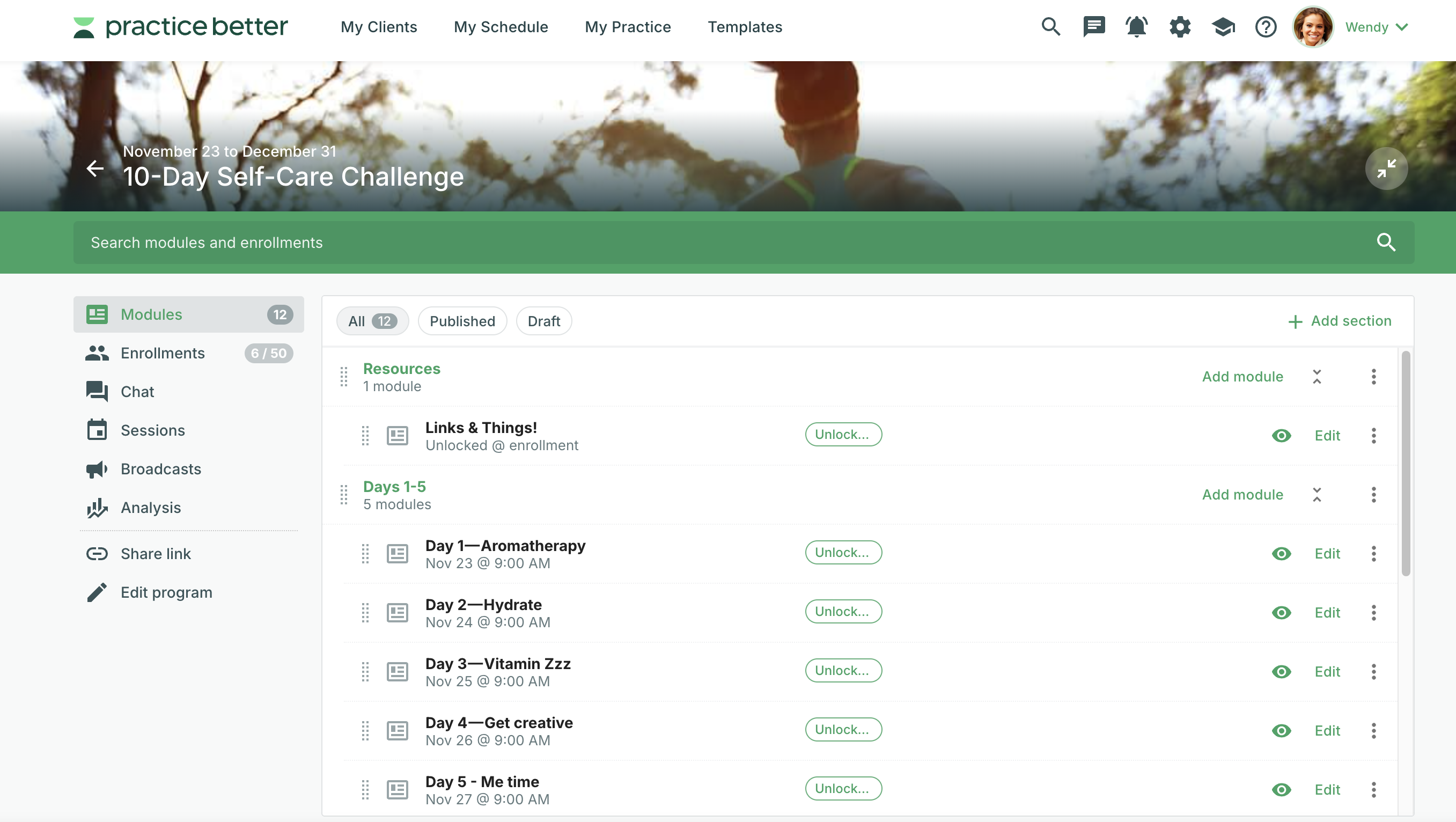
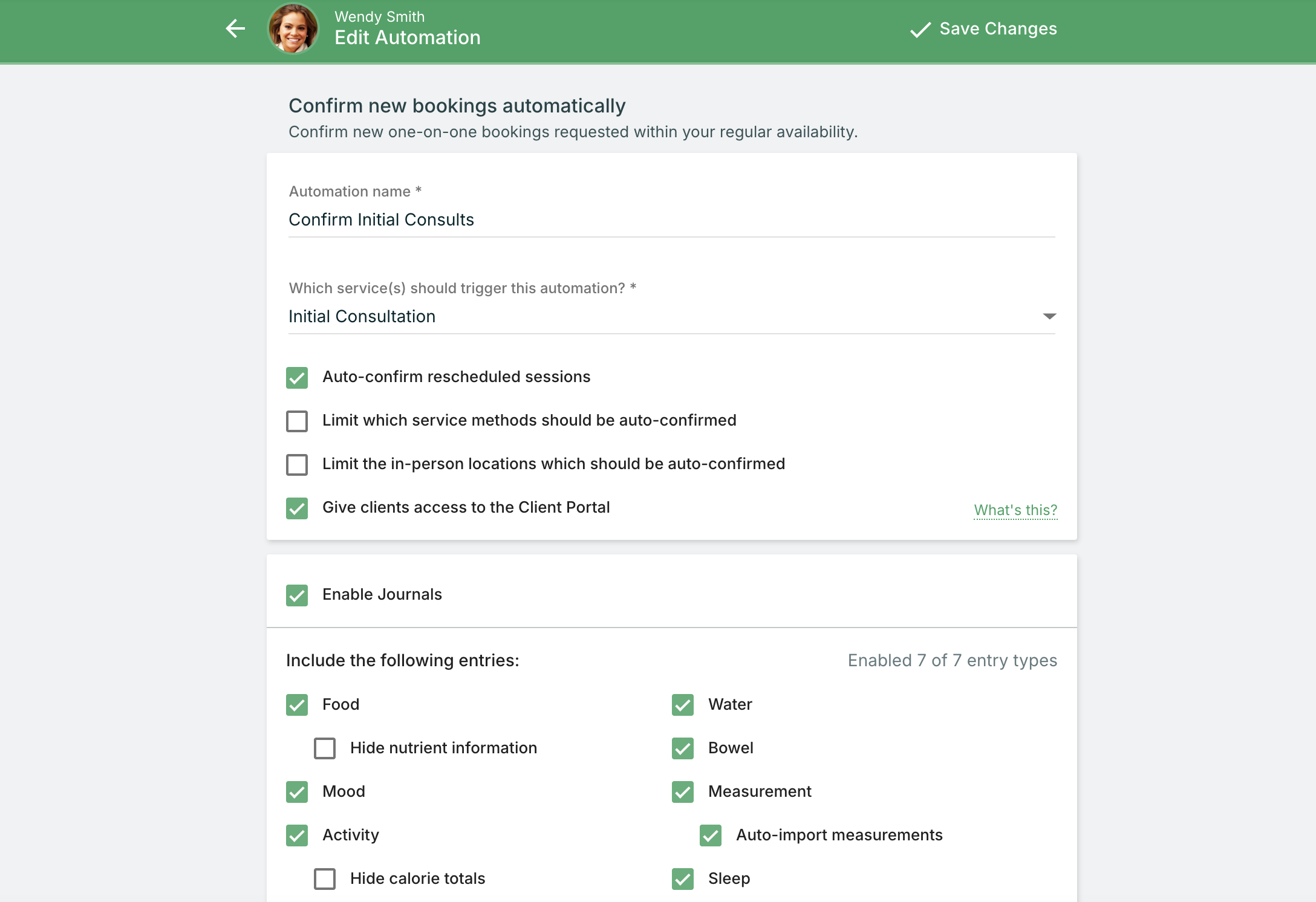
Practice Better's automation features include:
✅ Appointment reminder sequences - Set it once, applies to all appointments
✅ Program automation - Content unlocks on schedule without manual intervention
✅ Message templates with dynamic fields - Personalized at scale
✅ Habit trackers with automatic prompts - Clients get reminders, you see completion rates
✅ Form automation - Auto-send intake forms, assessments, and check-ins
✅ Integrated everything - Scheduling, messaging, programs, billing all in one place
Most importantly: You're not juggling 5 different tools (one for email, one for SMS, one for forms, one for programs, one for scheduling). Everything lives in one HIPAA-compliant platform.
Start simple. Here's a beginner-friendly first automation:
New Client Welcome Sequence:
Once this is working smoothly, add:
Build incrementally. Perfect one automation before adding the next.
Learn more about setting up automations.
Sending too many automated messages overwhelms clients and trains them to ignore your communications.
Rule of thumb: 1-2 automated touchpoints per week maximum (excluding appointment reminders).
Bad automation: "Hello! How are you? Keep up the good work!"
This feels robotic and doesn't provide value.
Better automation: "Hi Sarah, you're one week into your new supplement protocol. How's your digestion been? Reply if you have any questions!"
If clients reply to your automated check-ins and you don't respond, they'll stop engaging.
Set expectations: If response time might be delayed, say so: "I'll respond to messages within 24 hours on business days."
Check messages daily and respond personally.
Automation isn't "set it and forget it forever."
Review quarterly:
Before turning on any automation:
Nothing kills trust faster than broken automation.
Client engagement isn't optional—it's the difference between clients who get results and clients who drop out.
But sustainable engagement doesn't mean working 70-hour weeks trying to manually reach every client.
Smart automation lets you:
The goal isn't to remove yourself from client relationships. It's to use technology to handle repetitive tasks so you have MORE capacity for the moments that truly require your clinical judgment, empathy, and human connection.
Start with one automation. Get it working well. Then add the next. Within a few months, you'll have built a system that keeps clients engaged, accountable, and making progress—while giving you back hours of your week.
That's when your practice starts working for you instead of the other way around.
Practice Better makes automation effortless with customizable message sequences, program workflows, habit tracking prompts, and smart reminders—all in one HIPAA-compliant platform.
Stop spending hours on repetitive outreach and start building systems that keep clients engaged at scale.
{{free-trial-simple-text}}

If you're running an integrative practice and trying to keep every client engaged, supported, and accountable, you've probably hit this wall:
You know clients need between-session check-ins. You know regular touchpoints improve adherence and outcomes. You know consistent communication builds trust and keeps people on track.
But you're also drowning.
Between seeing clients, documenting sessions, answering messages, managing your schedule, and trying to have some semblance of a personal life, there simply aren't enough hours to manually reach out to every client multiple times between appointments.
So what happens? You either burn out trying to do it all manually, or you let engagement slip—and watch clients drift away because they don't feel supported.
Here's the reality: you cannot scale personalized engagement through manual effort alone.
But here's the good news: you don't have to.
Strategic automation lets you stay connected with 30, 50, or 100+ clients without spending hours on repetitive communication. The key is knowing what to automate, how to automate it, and—critically—where to preserve the human touch that makes your care special.
This guide shows you exactly how to build automated client engagement systems that feel personal, improve outcomes, and give you your time back.
Not everything should be automated. Some moments require your clinical judgment, empathy, and personalized attention. But many routine touchpoints can and should be handled by technology.
Here's the framework:
✅ Appointment reminders - Everyone needs to be reminded of upcoming appointments
✅ Welcome sequences - Every new client needs the same onboarding information
✅ Form reminders - Intake paperwork, symptom trackers, progress assessments
✅ Educational content - Articles, recipes, resources you share repeatedly
✅ Milestone celebrations - Program completion, check-in anniversaries
✅ Habit prompts - Daily supplement reminders, weekly check-in nudges
✅ Post-session summaries - Care plan recap, next steps, resources
💚 Responses to client questions - These need your clinical judgment
💚 Complex troubleshooting - When recommendations aren't working
💚 Emotional support - During challenging moments or breakthroughs
💚 Care plan adjustments - When you need to change the approach
💚 Crisis situations - Urgent concerns or safety issues
💚 Re-engagement - When clients have ghosted or are struggling
Aim for 80% of routine touchpoints automated and 20% deeply personalized.
This gives you consistency at scale while preserving bandwidth for the moments that truly require your unique expertise and human connection.
Appointment no-shows and last-minute cancellations are revenue killers. Research shows automated reminders can reduce no-shows by 20-30%.
Reminder 1: Confirmation (immediately after booking)
Why it works: Immediate confirmation reduces anxiety and gives clients the information they need right away.
Reminder 2: 48-hour notice
Why it works: Two days gives clients enough time to reschedule if needed without losing the appointment slot.
Reminder 3: 24-hour final reminder
Why it works: A final reminder catches anyone who might have forgotten despite previous reminders.
SMS text reminders: Higher open rates than email (98% vs. 20%)
Calendar invites: Automatic addition to client's personal calendar
Click-to-reschedule: One-click rescheduling reduces friction
Time zone detection: Especially important for telehealth practices
In Practice Better, you can set up all three reminders automatically. Once configured, every appointment gets reminders without any manual work—and you can customize the timing, content, and channels (email, SMS, or both).
Between-session check-ins keep clients accountable and engaged. But manually messaging 40+ clients every week isn't sustainable.
Post-appointment check-in (3-5 days after session)
Why it works: Checks in during the critical early implementation period when clients need support most.
Midpoint check-in (halfway between appointments)
Why it works: Prevents the "I'll deal with it before my next appointment" procrastination.
Pre-appointment preparation (2-3 days before next session)
Why it works: Ensures clients come prepared, making sessions more productive.
For clients working on specific habits (supplement compliance, water intake, meal timing, exercise, sleep), automated daily or weekly prompts can dramatically improve adherence.
Daily habit prompt (morning)
Hi [Client Name]! Quick check-in: Did you take your morning supplements? Log it here: [Link]
Daily habit prompt (evening)
Before bed: How many servings of vegetables did you have today? Track here: [Link]
Weekly habit review (Sunday evening)
Hi [Client Name], take 2 minutes to review your week: How many days did you complete your [habit]? Be honest—no judgment, just data! Update here: [Link]
In Practice Better, habit trackers can send automatic reminders at specific times, and clients can quickly log their progress from their phone. You can review completion rates at a glance before sessions.
Even automated messages should feel personal. Use these strategies:
1. Dynamic fields (name, goals, specific recommendations)
Not: "How are you doing?"
Better: "Hi Sarah, how's the new sleep routine working for you?"
2. Reference their specific goals
Not: "Keep up the good work!"
Better: "You mentioned wanting to reduce bloating—have you noticed any changes this week?"
3. Adjust tone to match your voice
If you're naturally warm and encouraging, your automated messages should be too. If you're more direct and straightforward, reflect that.
4. Segment by client type
Send different messages to:
5. Test and refine
Pay attention to response rates. If no one responds to a particular automated message, might be either poorly timed, poorly worded, or unnecessary.
Clients benefit from ongoing education, but you can't manually send resources to everyone who needs them. Create templates with reusable educational materials and automate the communication to clients.
1. Welcome sequence for new clients
Automatically deliver educational content over the first 4-8 weeks:
This ensures every new client gets foundational education without you manually sending it each time.
2. Condition-specific drip campaigns
Create automated educational sequences for common conditions you treat. As one possible example:
PCOS Education Series (8 weeks):
Clients automatically receive one email per week with articles, recipes, and action items.
3. Seasonal content automation
Set up automated content that sends based on calendar dates:
4. Protocol-specific resources
When you assign a protocol or program, automatically send relevant resources:
Gut healing protocol → Auto-sends:
Hormone balance program → Auto-sends:
The risk with automation is that it feels robotic, impersonal, or tone-deaf. Here's how to avoid that:
When a client asks a question or raises a concern, they deserve a personal response from you—not an automated reply.
Client: "I'm having intense stomach pain after taking the new supplement."
Response: Manual, immediate, clinical judgment required
Client: "Can I eat sweet potatoes on this protocol?"
Response: Manual, but can reference existing resources
If a client is struggling, frustrated, or experiencing a setback, turn off automation temporarily and engage personally.
Automated check-in might say: "How's it going this week?"
Personal message should say: "I know you mentioned feeling discouraged last session. I've been thinking about your situation and have some ideas. Can we chat?"
Automated: Welcome email with program overview
Personal addition: Voice memo saying, "I'm excited to work with you—here's what to focus on first"
Automated: Midpoint check-in
Personal addition: Review their tracker and add a specific observation: "I noticed your energy improved once you added morning protein—let's build on that"
Automated: Program completion email
Personal addition: Record a personalized video celebrating their specific wins
Set a reminder to review your automated sequences quarterly:
Stale, outdated automation is worse than no automation.
Clients should always be able to reach you directly. Every automated message should include:
"Questions? Reply to this message anytime—I'll respond as soon as I can."
When they do reply, respond personally and consider whether they need more hands-on support than your standard automation provides.
You need the right technology to make automation work. Here's what to look for:
1. Automated messaging sequences
2. Client portal with self-service access
3. Program and protocol automation
4. Smart reminders and notifications
5. Segmentation and tagging
Practice Better's automation features include:
✅ Appointment reminder sequences - Set it once, applies to all appointments
✅ Program automation - Content unlocks on schedule without manual intervention
✅ Message templates with dynamic fields - Personalized at scale
✅ Habit trackers with automatic prompts - Clients get reminders, you see completion rates
✅ Form automation - Auto-send intake forms, assessments, and check-ins
✅ Integrated everything - Scheduling, messaging, programs, billing all in one place
Most importantly: You're not juggling 5 different tools (one for email, one for SMS, one for forms, one for programs, one for scheduling). Everything lives in one HIPAA-compliant platform.
Start simple. Here's a beginner-friendly first automation:
New Client Welcome Sequence:
Once this is working smoothly, add:
Build incrementally. Perfect one automation before adding the next.
Learn more about setting up automations.
Sending too many automated messages overwhelms clients and trains them to ignore your communications.
Rule of thumb: 1-2 automated touchpoints per week maximum (excluding appointment reminders).
Bad automation: "Hello! How are you? Keep up the good work!"
This feels robotic and doesn't provide value.
Better automation: "Hi Sarah, you're one week into your new supplement protocol. How's your digestion been? Reply if you have any questions!"
If clients reply to your automated check-ins and you don't respond, they'll stop engaging.
Set expectations: If response time might be delayed, say so: "I'll respond to messages within 24 hours on business days."
Check messages daily and respond personally.
Automation isn't "set it and forget it forever."
Review quarterly:
Before turning on any automation:
Nothing kills trust faster than broken automation.
Client engagement isn't optional—it's the difference between clients who get results and clients who drop out.
But sustainable engagement doesn't mean working 70-hour weeks trying to manually reach every client.
Smart automation lets you:
The goal isn't to remove yourself from client relationships. It's to use technology to handle repetitive tasks so you have MORE capacity for the moments that truly require your clinical judgment, empathy, and human connection.
Start with one automation. Get it working well. Then add the next. Within a few months, you'll have built a system that keeps clients engaged, accountable, and making progress—while giving you back hours of your week.
That's when your practice starts working for you instead of the other way around.
Practice Better makes automation effortless with customizable message sequences, program workflows, habit tracking prompts, and smart reminders—all in one HIPAA-compliant platform.
Stop spending hours on repetitive outreach and start building systems that keep clients engaged at scale.
{{free-trial-simple-text}}