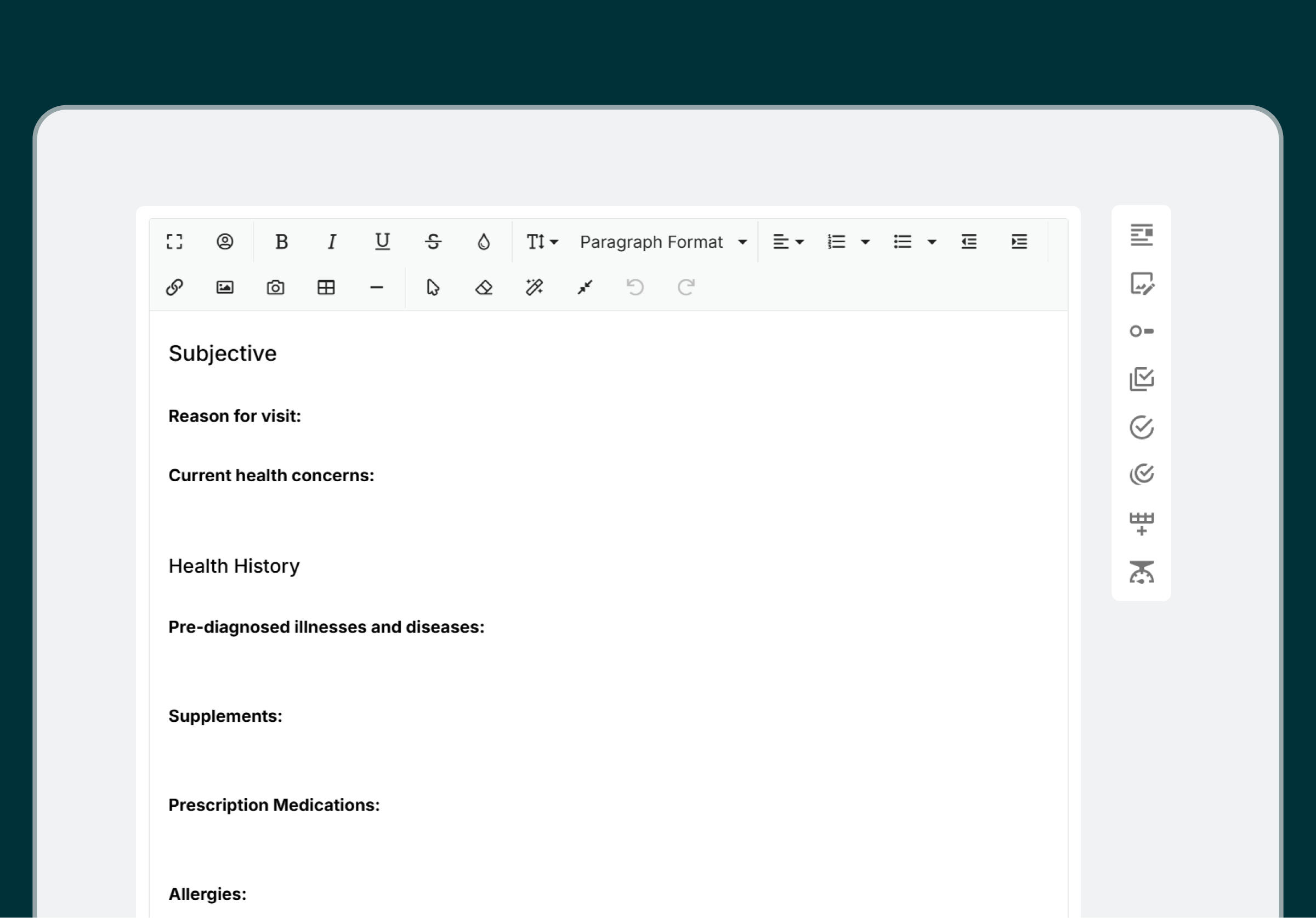
A charting template is a pre-built structure for a clinical note, with the sections, headings, and prompts already in place, so you document each session in the same order. Templates are built on a note format such as SOAP, ADIME, DAP, BIRP, or GROW, or on a custom format you design yourself (Practice Better, charting; Practice Better, templates). Practice Better's library also includes templates organized by visit, such as an initial consultation template and a follow-up session template.
This guide is a chooser. It matches charting templates to the visit in front of you and to your discipline, shows what goes in each format at a glance, and sets out how to build a small template set you reuse. Each format has its own deeper guide with worked examples, linked as you go.
Match the template to what the visit has to record. A first visit gathers history. A follow-up records change. A goal-setting session records commitments. Those are different jobs, and one template stretched across all three leaves sections empty or overloaded.
| Visit | What the note has to capture | Template to start from |
|---|---|---|
| Before the first visit | Medical and family history, past surgeries, medications | Intake questionnaire, completed by the client |
| First consultation | Health history, current concerns, the questions you ask every new client | Initial consultation session notes |
| Follow-up | Progress since last visit, what changed, next steps | Follow-up session notes, or a shorter version of your main format |
| Assessment-led visit | What the client reported, what you found, your assessment, the plan | SOAP |
| Nutrition care visit | Assessment, nutrition diagnosis, intervention, monitoring | ADIME |
| Goal-setting or accountability session | Current situation, desired outcome, obstacles, action items | GROW |
| Problem-focused check-in | One problem, what you did, how the client responded | PIE (see PIE notes) |
| Visit where symptom location matters | Where the client feels it, how strong, how it behaves | Your main format plus a body chart |
The first two rows work as a pair. The intake questionnaire collects history before the first session and adds it to the client record (Practice Better, intake questionnaire), so the consultation note can spend its space on what the client tells you in the room. For what to put on the form, see client intake forms.
Your discipline narrows the format. The table below maps each discipline to a starting format, gives the source for the match, and points to the guide that works that format through.
| Discipline | Format to start from | Why it fits | Go deeper |
|---|---|---|---|
| Registered dietitian or dietitian nutritionist | ADIME | ADIME is a standardized charting method used primarily by RDs and RDNs (Practice Better, ADIME template) | ADIME vs SOAP notes, nutritionist charts |
| Functional medicine or naturopathy | SOAP | Practice Better's SOAP template page names functional medicine and naturopathic practices as places SOAP is a trusted documentation method (Practice Better, SOAP template) | SOAP note examples |
| Counselor or therapist | SOAP, DAP, or BIRP | All three are supported note formats in Practice Better (Practice Better, charting) | SOAP notes in counseling |
| Health coach | GROW, if your sessions center on goals | GROW documents the client's current situation, desired outcomes, obstacles, and action items (Practice Better, GROW template) | GROW note template |
| Massage therapist or chiropractor | SOAP plus a body chart | Practice Better's body charting guide works through a chiropractic and a massage therapy body chart (body charting), and its SOAP note examples include a full note for each discipline (SOAP note examples) | Body charting, SOAP note examples |
Use the table as a starting point and check it against two things only you know: what your licensing body expects to see in a note, and what your own visits involve. Practice Better's template page puts the first one plainly: check with your regulatory agency that you are collecting the right information in the right way (Practice Better, templates).
Each format answers a fixed set of questions in a fixed order. Once you know the questions, you can tell which format fits a visit before you open a template.
| Format | Sections | What it puts first |
|---|---|---|
| SOAP | Subjective, Objective, Assessment, Plan | The client's report, then your findings |
| ADIME | Assessment, Diagnosis, Intervention, Monitoring and Evaluation | Measurements and history, then a nutrition diagnosis |
| DAP | Data, Assessment, Plan | Everything observed and reported, in one section |
| BIRP | Behavior, Intervention, Response, Plan | What the client presented, then what you did |
| PIE | Problem, Intervention, Evaluation | The problem, with its evidence |
| GROW | Current situation, desired outcomes, obstacles, action items | The client's goals |
SOAP. The structure separates what the client tells you from what you observe, then records your assessment and the plan. StatPearls describes SOAP as a widely used documentation method for clinicians and says the structure serves as a checklist and a cognitive aid (StatPearls, NCBI Bookshelf). For eight worked notes by discipline, see SOAP note examples. For the mechanics, see how to write a SOAP note.
ADIME. The format mirrors the four steps of the Nutrition Care Process: nutrition assessment, nutrition diagnosis, nutrition intervention, and nutrition monitoring and evaluation (ncpro.org). Practice Better's ADIME template documents the diagnosis as a Problem, Etiology, and Signs/Symptoms (PES) statement (Practice Better, ADIME template).
DAP and BIRP. DAP has three sections and BIRP has four. DAP folds the subjective and objective material into one Data section. BIRP leads with the client's behavior, then records your intervention, the client's response, and the plan. If your sessions are talk-based, test DAP first: one Data section removes the call about whether a detail is subjective or objective. If the people who read your notes want your intervention and the client's response visible side by side, test BIRP.
PIE. The OpenStax Fundamentals of Nursing textbook defines PIE as a form of problem-oriented documentation in three parts: the problem you identify, the intervention taken to address it, and the client's response (OpenStax, section 14.5). With no separate objective section, the evidence for the problem goes into the problem statement. A blank template and six examples are in PIE notes.
GROW. Practice Better's GROW template documents the client's current situation, desired outcomes, potential obstacles, and action items, to build a plan the client commits to (Practice Better, GROW template). It suits sessions where the main record is what the client agreed to do next.
When two formats both fit, decide on three questions: who reads the note, what you share with the client, and whether a team has to read each other's notes.
Who reads the note. If a payer, supervisor, or another clinician reads your notes, use the format they already expect, and confirm it with them before you build a template around it. If you are the only reader, pick the format whose first section matches what you think about first in a session.
What the client sees. If you hand the client a plan after each visit, pick a format with a plan or action section that stands on its own. SOAP, DAP, BIRP, and GROW all end in one.
Whether a team shares the record. In a group practice, different disciplines can keep their own formats. Practice Better lets each provider pick the structure that fits their discipline, and every note still carries required fields for assessment, plan, and follow-up whichever format is used (Practice Better, templates).
Whichever you pick, stay with it. The payoff of a fixed format comes when you compare this session's note with the last one and the sections line up.
Whatever format you pick, check that your template also has a place for these fields, which sit outside the format's own sections:
Confirm the list with your licensing body and your payers before you lock a template in.
You set up a charting template set in six steps: list your visit types, pick one format per visit type, start from a ready-made template, decide what the client sees, pull in what you already know, and test each template on a real session.
A set of three or four templates covers a practice that runs first visits, follow-ups, and one specialty visit. Add a template when a new visit type keeps coming up, and retire one when you stop opening it.
In Practice Better, you add a template from the library, edit it to suit your practice, and create session notes from it (note templates guide). You can search the template library by profession and by format, every pricing plan includes full access to the form and note templates, and once added, note templates sit under My Practice, in Note Templates (Practice Better, templates).
Notes can use SOAP, ADIME, DAP, BIRP, or a custom format built from scratch, and you can attach protocols, labs, and tasks directly to a session note (Practice Better, charting).
For a feature walkthrough with video, see note templates for busy wellness professionals.
{{soap-note-template}}
SOAP is a note format: four sections in a fixed order. A charting template is the reusable structure you build from a format, with your own headings, prompts, and defaults filled in. One format can sit behind several templates, such as a SOAP template for first visits and a shorter SOAP template for follow-ups.
Yes. Practice Better's template features let each provider use SOAP, ADIME, GROW, or other formats and pick the structure that fits their discipline, while every note keeps required fields for assessment, plan, and follow-up (Practice Better, templates). Within one practitioner's work, a separate template per visit type keeps each kind of visit charted the same way every time.
Some are. Practice Better's template pages offer free downloads, such as the SOAP note template and the ADIME note template. Inside Practice Better, every pricing plan includes full access to its library of form and note templates. Program templates are the exception: they come with the Professional, Plus, and Team plans, because programs and courses are only available on those plans (Practice Better, templates).
In Practice Better, yes. Placeholders in a note template pull information from the client record into the note, which cuts repeated typing and keeps the client's details accurate across notes (how practitioners unlock note templates).
Only the parts you share. Practice Better note templates can hold multiple text sections, and you choose which ones the client sees. In a SOAP template, for example, you can keep the subjective, objective, and assessment sections private and set the plan section to be shared by default (how practitioners unlock note templates).
Pick a format for each visit type you run, start from the closest ready-made template, and chart one real session in each before you make it your default.
Start a free trial of Practice Better to add charting templates from the library and build the rest of your set around your own visits.
{{free-trial-simple-text}}

A charting template is a pre-built structure for a clinical note, with the sections, headings, and prompts already in place, so you document each session in the same order. Templates are built on a note format such as SOAP, ADIME, DAP, BIRP, or GROW, or on a custom format you design yourself (Practice Better, charting; Practice Better, templates). Practice Better's library also includes templates organized by visit, such as an initial consultation template and a follow-up session template.
This guide is a chooser. It matches charting templates to the visit in front of you and to your discipline, shows what goes in each format at a glance, and sets out how to build a small template set you reuse. Each format has its own deeper guide with worked examples, linked as you go.
Match the template to what the visit has to record. A first visit gathers history. A follow-up records change. A goal-setting session records commitments. Those are different jobs, and one template stretched across all three leaves sections empty or overloaded.
| Visit | What the note has to capture | Template to start from |
|---|---|---|
| Before the first visit | Medical and family history, past surgeries, medications | Intake questionnaire, completed by the client |
| First consultation | Health history, current concerns, the questions you ask every new client | Initial consultation session notes |
| Follow-up | Progress since last visit, what changed, next steps | Follow-up session notes, or a shorter version of your main format |
| Assessment-led visit | What the client reported, what you found, your assessment, the plan | SOAP |
| Nutrition care visit | Assessment, nutrition diagnosis, intervention, monitoring | ADIME |
| Goal-setting or accountability session | Current situation, desired outcome, obstacles, action items | GROW |
| Problem-focused check-in | One problem, what you did, how the client responded | PIE (see PIE notes) |
| Visit where symptom location matters | Where the client feels it, how strong, how it behaves | Your main format plus a body chart |
The first two rows work as a pair. The intake questionnaire collects history before the first session and adds it to the client record (Practice Better, intake questionnaire), so the consultation note can spend its space on what the client tells you in the room. For what to put on the form, see client intake forms.
Your discipline narrows the format. The table below maps each discipline to a starting format, gives the source for the match, and points to the guide that works that format through.
| Discipline | Format to start from | Why it fits | Go deeper |
|---|---|---|---|
| Registered dietitian or dietitian nutritionist | ADIME | ADIME is a standardized charting method used primarily by RDs and RDNs (Practice Better, ADIME template) | ADIME vs SOAP notes, nutritionist charts |
| Functional medicine or naturopathy | SOAP | Practice Better's SOAP template page names functional medicine and naturopathic practices as places SOAP is a trusted documentation method (Practice Better, SOAP template) | SOAP note examples |
| Counselor or therapist | SOAP, DAP, or BIRP | All three are supported note formats in Practice Better (Practice Better, charting) | SOAP notes in counseling |
| Health coach | GROW, if your sessions center on goals | GROW documents the client's current situation, desired outcomes, obstacles, and action items (Practice Better, GROW template) | GROW note template |
| Massage therapist or chiropractor | SOAP plus a body chart | Practice Better's body charting guide works through a chiropractic and a massage therapy body chart (body charting), and its SOAP note examples include a full note for each discipline (SOAP note examples) | Body charting, SOAP note examples |
Use the table as a starting point and check it against two things only you know: what your licensing body expects to see in a note, and what your own visits involve. Practice Better's template page puts the first one plainly: check with your regulatory agency that you are collecting the right information in the right way (Practice Better, templates).
Each format answers a fixed set of questions in a fixed order. Once you know the questions, you can tell which format fits a visit before you open a template.
| Format | Sections | What it puts first |
|---|---|---|
| SOAP | Subjective, Objective, Assessment, Plan | The client's report, then your findings |
| ADIME | Assessment, Diagnosis, Intervention, Monitoring and Evaluation | Measurements and history, then a nutrition diagnosis |
| DAP | Data, Assessment, Plan | Everything observed and reported, in one section |
| BIRP | Behavior, Intervention, Response, Plan | What the client presented, then what you did |
| PIE | Problem, Intervention, Evaluation | The problem, with its evidence |
| GROW | Current situation, desired outcomes, obstacles, action items | The client's goals |
SOAP. The structure separates what the client tells you from what you observe, then records your assessment and the plan. StatPearls describes SOAP as a widely used documentation method for clinicians and says the structure serves as a checklist and a cognitive aid (StatPearls, NCBI Bookshelf). For eight worked notes by discipline, see SOAP note examples. For the mechanics, see how to write a SOAP note.
ADIME. The format mirrors the four steps of the Nutrition Care Process: nutrition assessment, nutrition diagnosis, nutrition intervention, and nutrition monitoring and evaluation (ncpro.org). Practice Better's ADIME template documents the diagnosis as a Problem, Etiology, and Signs/Symptoms (PES) statement (Practice Better, ADIME template).
DAP and BIRP. DAP has three sections and BIRP has four. DAP folds the subjective and objective material into one Data section. BIRP leads with the client's behavior, then records your intervention, the client's response, and the plan. If your sessions are talk-based, test DAP first: one Data section removes the call about whether a detail is subjective or objective. If the people who read your notes want your intervention and the client's response visible side by side, test BIRP.
PIE. The OpenStax Fundamentals of Nursing textbook defines PIE as a form of problem-oriented documentation in three parts: the problem you identify, the intervention taken to address it, and the client's response (OpenStax, section 14.5). With no separate objective section, the evidence for the problem goes into the problem statement. A blank template and six examples are in PIE notes.
GROW. Practice Better's GROW template documents the client's current situation, desired outcomes, potential obstacles, and action items, to build a plan the client commits to (Practice Better, GROW template). It suits sessions where the main record is what the client agreed to do next.
When two formats both fit, decide on three questions: who reads the note, what you share with the client, and whether a team has to read each other's notes.
Who reads the note. If a payer, supervisor, or another clinician reads your notes, use the format they already expect, and confirm it with them before you build a template around it. If you are the only reader, pick the format whose first section matches what you think about first in a session.
What the client sees. If you hand the client a plan after each visit, pick a format with a plan or action section that stands on its own. SOAP, DAP, BIRP, and GROW all end in one.
Whether a team shares the record. In a group practice, different disciplines can keep their own formats. Practice Better lets each provider pick the structure that fits their discipline, and every note still carries required fields for assessment, plan, and follow-up whichever format is used (Practice Better, templates).
Whichever you pick, stay with it. The payoff of a fixed format comes when you compare this session's note with the last one and the sections line up.
Whatever format you pick, check that your template also has a place for these fields, which sit outside the format's own sections:
Confirm the list with your licensing body and your payers before you lock a template in.
You set up a charting template set in six steps: list your visit types, pick one format per visit type, start from a ready-made template, decide what the client sees, pull in what you already know, and test each template on a real session.
A set of three or four templates covers a practice that runs first visits, follow-ups, and one specialty visit. Add a template when a new visit type keeps coming up, and retire one when you stop opening it.
In Practice Better, you add a template from the library, edit it to suit your practice, and create session notes from it (note templates guide). You can search the template library by profession and by format, every pricing plan includes full access to the form and note templates, and once added, note templates sit under My Practice, in Note Templates (Practice Better, templates).
Notes can use SOAP, ADIME, DAP, BIRP, or a custom format built from scratch, and you can attach protocols, labs, and tasks directly to a session note (Practice Better, charting).
For a feature walkthrough with video, see note templates for busy wellness professionals.
{{soap-note-template}}
SOAP is a note format: four sections in a fixed order. A charting template is the reusable structure you build from a format, with your own headings, prompts, and defaults filled in. One format can sit behind several templates, such as a SOAP template for first visits and a shorter SOAP template for follow-ups.
Yes. Practice Better's template features let each provider use SOAP, ADIME, GROW, or other formats and pick the structure that fits their discipline, while every note keeps required fields for assessment, plan, and follow-up (Practice Better, templates). Within one practitioner's work, a separate template per visit type keeps each kind of visit charted the same way every time.
Some are. Practice Better's template pages offer free downloads, such as the SOAP note template and the ADIME note template. Inside Practice Better, every pricing plan includes full access to its library of form and note templates. Program templates are the exception: they come with the Professional, Plus, and Team plans, because programs and courses are only available on those plans (Practice Better, templates).
In Practice Better, yes. Placeholders in a note template pull information from the client record into the note, which cuts repeated typing and keeps the client's details accurate across notes (how practitioners unlock note templates).
Only the parts you share. Practice Better note templates can hold multiple text sections, and you choose which ones the client sees. In a SOAP template, for example, you can keep the subjective, objective, and assessment sections private and set the plan section to be shared by default (how practitioners unlock note templates).
Pick a format for each visit type you run, start from the closest ready-made template, and chart one real session in each before you make it your default.
Start a free trial of Practice Better to add charting templates from the library and build the rest of your set around your own visits.
{{free-trial-simple-text}}